
Hey there Linebackers!
I keep seeing a lot of questions and concerns repeated in the comments, so I wanted to bounce by to put all that Q&A in one spot.
Take a peek at the information below to see if your questions or concerns are answered.

ANY CRASHING IN THE FOOTBALL FIELD
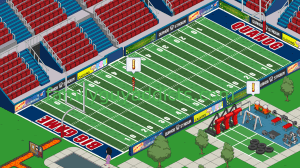
I had this in the main post, but still being asked so putting it here. For those of you that have been crashing on ANY actions with the Football Field…
- Force Close the App to make sure you are out of it.
- Go to your App Market and make sure you Download the New 1.17.5 Version of the App
- Restart Your Device
- Try Football Field action again to see if crashing issue gone.
If this does not help, try outside sources if you want…
- Use the Facebook Version of the App to see if you can get past the crash point, then go back to your device
- Use another device (like an iOS) that is on newest update to see if you can get past the issue then go back to your device. (This requires a saved game that you can log in and LOAD)
If you still have the issue, note in the comments your Make and Model of device and also in game message TinyCo. Notating your Make and Model below will also help me pinpoint a trend in device/models specifics. For example, the patch did fix it for my on my Samsung GS4 and Alissa’s Samsung GS6… but I am seeing those on GS3 still having issues
UPDATE 1/24: From the reports you are giving me and the response from TinyCo, it looks like those on Lollipop were able to get the Update to take, however those on lower versions are having troubles still (like KitKat). If you can update your OS to Lollipop, it may help. Otherwise still looking into some other things and sending them all your stats to keep fine tuning it.
Thanks again for providing the Exact information I was looking for in the Makes and Models (OS version helped too. 🙂 )
FYI… just in case… some of you can try other basics to see if that is impacting play too…
UPDATE 1/26: More patches went out to help resolve the issue. Try to force close the app and completely restart your device to make sure the patches are in place and see if you can continue on again.
FOOTBALLS/ TOUCHDOWN

Another area of the Football Field is the Footballs themselves. As this is the ONLY way to get them and there still seem to be some confusion on when/how they drop.
Here is what the game says on the drops…
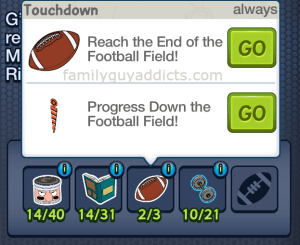
This is the confusing part to many players… specifically the “Progress Down the Football Field!” part. What this essentially means is, just like in a real Football Game, you can score from ANYWHERE on the Football Field. You can run a pass in from 80 yards or slowly work your way to the End of the Football Field.
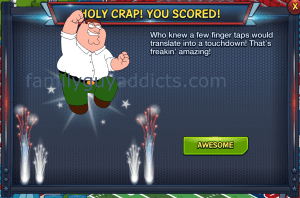
Here is what it looks like when you “Reach the End of the Football Field” and win a Football! This one takes time as you start at 80 Yards and work your way down the Field.
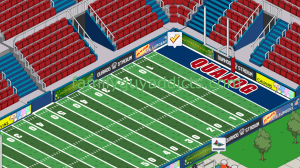
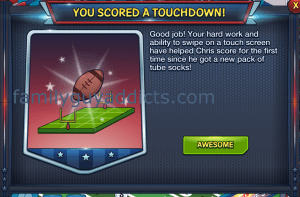
Here is what it looks like if you “Progress Down the Football Field!” and win a Football! This one happens on a more Rare to Extra Rare rate. In other words, it is random to get it without going all the way to the End of the Field.
MATERIAL DROPS


I do not know if this will work as well for others as it does for me, but I wanted to suggest it anyway. I always “Stagger” my Characters with their drops. This means I may send each one minutes or even an hour apart. That way when it comes time to collect I am not collecting for ALL at the exact same time, instead it is one at a time. It seems to give me pretty well results when I do this.
At times, for the rare drops, I will “reset” a Character by sending them on a short hour or less task, then back on the Material earning one.
Just keep in mind that ANYTHING outside an Always drop will have a various drop, and I do mean various. You may get 4 in a row, then none in a row. Or get one, then none, then one, then none, etc. Just keep playing. Try alternating methods to see what works for you (like I noted above)
SCOREBOARD
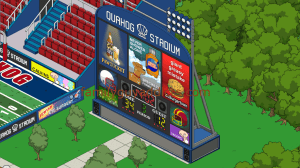
There are ONLY 3 Games available to play in Phase 1. Once you complete the 3rd game and win Richard Sherman, you are as far as you can go in Phase 1. More Games will unlock as Phase 2, then Phase 3 go live each week. Touchdown Jesus most likely being the Final Prize.
Now speaking of the Games you need to use Materials to check of each Game. These Materials have a “shared” use though. In other words MORE than one item needs them. Here are some examples.
 Helmets: Football Field Requirements AND Games AND Football Jersey Chris AND Rob Gronkowski
Weights: Games AND Rob Gronkowski
 Face Grease: Football Jersey Chris AND Football Field Requirements AND Games
 Playbook: Football Jersey Chris AND Games
Once an item is used, it is gone. For instance once 1 Football is used to complete Game 1, counter will go back down 1 Football, subtracting the 1 used. Watch closely WHERE you use the Materials, especially if you wanted them for a Character.
Here is an odd thing out though to look for… At times the Football Requirements will let you use the saved up items to just check of the requirements by tapping “GO”. These will be visually recognized by the amount (like 15/3).
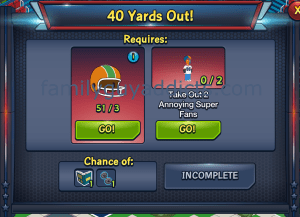
Other times it will make you still collect them regardless how many you already have, so watch for these too. These will show nothing currently earned (like 0/3).

ANNOYING SUPER FANS

With these guys, you will get multiple variable drops. In other words you will randomly get one, if ANY, of the following during Phase 1.
 $10 Coin
 1 Face Grease
2 Face Grease
 1 Kitten
Again, the drops will vary and your results will vary.
UPDATE 1/26: DEVICE INCOMPATIBLE
This was already mentioned in the past on a few other posts, but wanted to re-post it here as it seems to keep coming up on the comments.
If your device shows incompatible with the game (seeing a lot of GS5 showing this), there are some suggested steps to try… it mainly revolves around Google Play, NOT the game.
As a temporary workaround, Google suggests clearing Google Play Store’s data from your phone and then trying to install the game. To do this, go to Settings > Application Manager > All > Google Play Store > Clear data.A second possible workaround is to re-install the entire Google Play Store App. To do this go to Settings > Apps > All > Google Play Store > uninstall updates. After that try to install the game again.
Otherwise TinyCo is still trying to see if they can find a work around too on their end to help Players running into it.
These are the main points I am seeing. Hopefully this will help you too.
Did this answer your questions? Understand the Football Drops better now? Let us know.
~Bunny






 Family Guy Addicts
Settings > Application Manager > All > Google Play Store > Clear data.
This one worked for me. I’m now able to update to FG 1.17.5.
thanks for sharing
LikeLike
Hi,
My game is crashing when trying to collect the (70 Yards Out) Face Grease (saying 8/2). When clicking on Go! it crashes.
Using a Galaxy S6 – SM-G920F with Android 5.1.1
LikeLike
Hey everybody, TinyCo just got in touch with me and said that they pushedh through a patch that should fix most of these problems. They say to start the game and try and collect the footballs, if it doesn’t work you may have to restart your device And do it again. If it still doesn’t work after that, they say for everyone to get back in touch with them
LikeLike
I might have a workaround for the crash on touchdowns, unless they fixed it while I was messing around.
Load up the game, visit Ollieland, back to Quahog, hit the awesome button to claim the touchdown and immediately hit the button for Ollieland. When you go back to Quahog again you can tap on the scoreboard and on Game 1 you’ll see you were awarded the touchdown. Jumping to Ollieland must bypass the bug.
I visit Ollieland first because it makes the second visit load a lot faster, previous attempts without doing that failed. Sometimes the game will crash immediately, other times it gives a few seconds so it might not be important.
Give it a go if you’re getting the crash, it might take a few attempts.
Galaxy Note (GT N7000), Jellybean 4.1.2
LikeLike
Patches being sent out.
LikeLike
Here is a fix that worked for me and nothing else did
Clicked on checkmark
Did not click on awesome instead went to Ollie Land
When I returned the football field was ready to go again
LikeLike
Patches going out should be helping.
LikeLike
I am still crashing when I got to make a touchdown also. I am on a Kindle Fire.
LikeLike
me 2 kindle fire hd 6 i even changed the gfx to low every time i try n i click the helmet and or the face paint it crashes i got it once to go and then right after it crashed never guna get my chearleader bonnie lol
LikeLike
I think they fixed the touch down crash. I can collect my football now 🙂
LikeLike
Are they planning on doing anything about the crashing issues because a lot of us can’t get past the first touchdown and not able to progress in our games I’ve messaged tiny co when it first happened and not heard a thing from them thought you might have a better idea
LikeLike
Outside my update above, and still working on it…. that is the latest I have. Try it again though… they keep pushing fixes.
LikeLike
Same problem here, unable to score the first touchdown in the practice game. When I click the “awesome” button and try to collect the football, it crashes. I have also sent a message to tinyco from the in-game system. Running game version 1.17.5 on Android 4.4.4 (KitKat) on a Motorola Droid Maxx. Force closing the game and restarting the phone didn’t help. 😦
LikeLike
Playing on zte grand max x. Was using Google play, updated version. Crashes after clicking awesome as soon as the football is collected. Every time. Uninstalled app, checked storage, reinstalled app thru amazon. Loaded my saved game with my username & password. Game works fine with no problems until I collect the football again. Still crashing every time.
LikeLike
Android version 4.2.2 on a Samsung Halasy Tab 3 Lite. Still can’t collect my first touchdown, I’ve done all the troubleshooting (including uninstalling/reinstalling completely). I’ll try my wife’s phone and nothing!
LikeLike
I’m playing on an iPad 2 with latest iOS update. My crashed multiple times when I tapped “Hike” in the football field. I thought it was just my game so, I removed most of my animated demos and after when I tapped “Hike” the crashing ceased. Perhaps some of you with crashing issues might want to try storing unneeded animated items.
LikeLike
That is my other concerns. Some still crashing may have the OTHER issue of lack of memory/space for device to handle the game… where they could use these options instead…
LikeLike
Hope I am not speaking too soon but I believe that may of been part of my problem as well.
When the crash during touchdown first started, I put more of my unused buildings into storage per your advise under troubleshooting and was still having trouble. Today, I put more buildings into storage and was able to get past the touchdown and the goals after that.
I use a Kindle Fire HD 7, in case this helps.
LikeLike
Just tried this after a day of crashing and it worked. I have now scored a touch down and can progress in the game. Thanks kikakhu. It should help others.
LikeLike
I have an Samsung Galaxy tab 2 7in with 4.2.2 android os update. Says thats the current form this model.
clicked on the check at the goalpost at 3a.m. saturday and it showed the awesome screne with the football on it. Clicked awesome it, screne dissapeared, fireworks exploded, football and money bounced… game threw me out.
After a few attempts I quit tryin. And just attemp it again after each subsequent play session since the question mark never goes away. I noticed at one point I had a football in my counter window at top of screen.
used it in scareboard to win Game 1. Started next missions. Game 2 is still available and I have 5 footballs
I quess thats a silver lining to this 3days of cloudy playing.
LikeLike
I’m using a kindle fire and the game is crashing after getting the first touchdown and clicking the awesome button
LikeLike
Version 1.17.5, Kindle Fire, still crashes on touchdown. Facebook is a joke as it takes almost half an hour just to load, if it will load at all. (I’ve only gotten it to load once) So for now I’m stuck.
LikeLike
Samsung galaxy note 2. Software and game updated. Keeps crashing at goal line.
LikeLike
Droid max from Motorola, crashes after touchdown, closed out reinstalled, and can’t advance.
LikeLike
still doesn”t work 3 days in a row great
LikeLike
Kindle Fire HD crashes at touchdown
LikeLike
Bunny, nice to see you up and about! Hope all is better with you.
LikeLike
Does gronk have tasks to drop anything? Helmets weights books…
LikeLike
Nothing yet
LikeLike
Thanks for all you are doing to try and help Tinyco get this issue fixed ladies.
Bit annoying.
Mine forces the game closed when I press the awesome button after scoring a try, that’s the only problem….so far.
I’m on a cheap android – Huawei and on latest update. I’m just happy the phone loads the game considering how large the file really is (about a GB!).
I hope you are all better now Bunny and over what ever was wrong with you.
Thanks again.
LikeLike
Julie butler I’m having problems when I get footballs. I have uninstalled game and reinstalled game.it did not help. Samsung 1.16.0
LikeLike
Make / Model / OS: Samsung Galaxy S5 SM-G900F / KitKat
Can’t make progress on the field, therefore can’t get playbooks to progress Football Jersey Chris (have 8/14) nor progress Game 2 since can’t get weights (have 4/14).
Hope they fix it for other OSs other than Lollipop or credit somehow for the delay for those people who are still stuck at this point.
Cheers!
LikeLike
Motorola droid mini
LikeLike
Android version 4.4.4 on a Motorola Droid Ultra (Motorola X8 Mobile Computing System). Still can’t collect my first touchdown, I’ve done all the troubleshooting (including uninstalling/reinstalling completely). I’ll try my wife’s phone and cross my fingers! Thank you for always being so helpful and patient Bunny, you rock!
LikeLike
I’m using an Amazon Fire Phone, updated to 1.17.5 and it crashes every time. Tried it on my wife’s iPad, which is still on 1.17.0, and it worked. The only problem is, the game crashes constantly on the iPad, making it impossible to play! I’m going to try it on the phone and see if my progress stuck.
LikeLike
I have a kindle fire 10, got the update and it fixed the crashing when I click “get” for the face grease, but I still crashed on my touch down today 😦 Didn’t see any other kindle users with issues so I figured I should let you know
LikeLike
There are at least 3 or 4 reported here.
LikeLike
Running lollipop. and latest updates…..still crashing
LikeLike
Device make and model?
LikeLike
My kindle fire crashes when I get a touchdown too so I’ve been using Facebook on my netbook at that point to get past it, then back to my kindle in between.
LikeLike
Wish I could, but my daughter has my laptop for her uni work seeing as her year old Toshiba is pish and keeps crashing.
LikeLike
Thanks for the update. Kinda sucks that they aren’t accommodating kit kat anymore. I’ve got 3 more months before Im eligible for a new phone upgrade. I get to upgrade phones every 2 years, which is too bad since it seems like they are labeled old and outdated after 6 months.
LikeLike
It is more that Kit Kat didn’t like it, not that they weren’t accommodating it. Such is the life of any game house when you have infinite possibilities of devices, operating systems, etc that you are trying to get compatible with your game. Lol. 😉
LikeLike