
Hey there Linebackers!
I keep seeing a lot of questions and concerns repeated in the comments, so I wanted to bounce by to put all that Q&A in one spot.
Take a peek at the information below to see if your questions or concerns are answered.
ANY CRASHING IN THE FOOTBALL FIELD
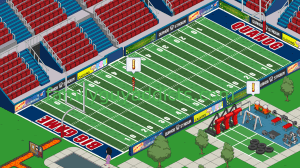
I had this in the main post, but still being asked so putting it here. For those of you that have been crashing on ANY actions with the Football Field…
- Force Close the App to make sure you are out of it.
- Go to your App Market and make sure you Download the New 1.17.5 Version of the App
- Restart Your Device
- Try Football Field action again to see if crashing issue gone.
If this does not help, try outside sources if you want…
- Use the Facebook Version of the App to see if you can get past the crash point, then go back to your device
- Use another device (like an iOS) that is on newest update to see if you can get past the issue then go back to your device. (This requires a saved game that you can log in and LOAD)
If you still have the issue, note in the comments your Make and Model of device and also in game message TinyCo. Notating your Make and Model below will also help me pinpoint a trend in device/models specifics. For example, the patch did fix it for my on my Samsung GS4 and Alissa’s Samsung GS6… but I am seeing those on GS3 still having issues
UPDATE 1/24: From the reports you are giving me and the response from TinyCo, it looks like those on Lollipop were able to get the Update to take, however those on lower versions are having troubles still (like KitKat). If you can update your OS to Lollipop, it may help. Otherwise still looking into some other things and sending them all your stats to keep fine tuning it.
Thanks again for providing the Exact information I was looking for in the Makes and Models (OS version helped too. 🙂 )
FYI… just in case… some of you can try other basics to see if that is impacting play too…
UPDATE 1/26: More patches went out to help resolve the issue. Try to force close the app and completely restart your device to make sure the patches are in place and see if you can continue on again.
FOOTBALLS/ TOUCHDOWN

Another area of the Football Field is the Footballs themselves. As this is the ONLY way to get them and there still seem to be some confusion on when/how they drop.
Here is what the game says on the drops…
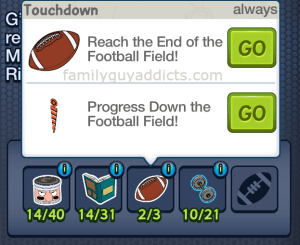
This is the confusing part to many players… specifically the “Progress Down the Football Field!” part. What this essentially means is, just like in a real Football Game, you can score from ANYWHERE on the Football Field. You can run a pass in from 80 yards or slowly work your way to the End of the Football Field.
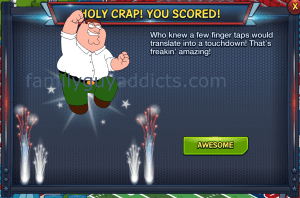
Here is what it looks like when you “Reach the End of the Football Field” and win a Football! This one takes time as you start at 80 Yards and work your way down the Field.
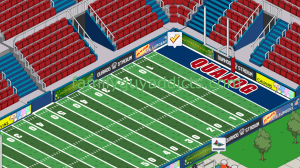
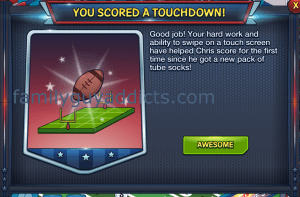
Here is what it looks like if you “Progress Down the Football Field!” and win a Football! This one happens on a more Rare to Extra Rare rate. In other words, it is random to get it without going all the way to the End of the Field.
MATERIAL DROPS


I do not know if this will work as well for others as it does for me, but I wanted to suggest it anyway. I always “Stagger” my Characters with their drops. This means I may send each one minutes or even an hour apart. That way when it comes time to collect I am not collecting for ALL at the exact same time, instead it is one at a time. It seems to give me pretty well results when I do this.
At times, for the rare drops, I will “reset” a Character by sending them on a short hour or less task, then back on the Material earning one.
Just keep in mind that ANYTHING outside an Always drop will have a various drop, and I do mean various. You may get 4 in a row, then none in a row. Or get one, then none, then one, then none, etc. Just keep playing. Try alternating methods to see what works for you (like I noted above)
SCOREBOARD
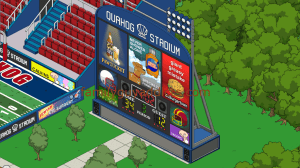
There are ONLY 3 Games available to play in Phase 1. Once you complete the 3rd game and win Richard Sherman, you are as far as you can go in Phase 1. More Games will unlock as Phase 2, then Phase 3 go live each week. Touchdown Jesus most likely being the Final Prize.
Now speaking of the Games you need to use Materials to check of each Game. These Materials have a “shared” use though. In other words MORE than one item needs them. Here are some examples.
 Helmets: Football Field Requirements AND Games AND Football Jersey Chris AND Rob Gronkowski
Weights: Games AND Rob Gronkowski
 Face Grease: Football Jersey Chris AND Football Field Requirements AND Games
 Playbook: Football Jersey Chris AND Games
Once an item is used, it is gone. For instance once 1 Football is used to complete Game 1, counter will go back down 1 Football, subtracting the 1 used. Watch closely WHERE you use the Materials, especially if you wanted them for a Character.
Here is an odd thing out though to look for… At times the Football Requirements will let you use the saved up items to just check of the requirements by tapping “GO”. These will be visually recognized by the amount (like 15/3).
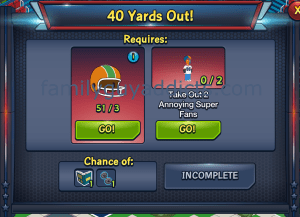
Other times it will make you still collect them regardless how many you already have, so watch for these too. These will show nothing currently earned (like 0/3).

ANNOYING SUPER FANS

With these guys, you will get multiple variable drops. In other words you will randomly get one, if ANY, of the following during Phase 1.
 $10 Coin
 1 Face Grease
2 Face Grease
 1 Kitten
Again, the drops will vary and your results will vary.
UPDATE 1/26: DEVICE INCOMPATIBLE
This was already mentioned in the past on a few other posts, but wanted to re-post it here as it seems to keep coming up on the comments.
If your device shows incompatible with the game (seeing a lot of GS5 showing this), there are some suggested steps to try… it mainly revolves around Google Play, NOT the game.
As a temporary workaround, Google suggests clearing Google Play Store’s data from your phone and then trying to install the game. To do this, go to Settings > Application Manager > All > Google Play Store > Clear data.A second possible workaround is to re-install the entire Google Play Store App. To do this go to Settings > Apps > All > Google Play Store > uninstall updates. After that try to install the game again.
Otherwise TinyCo is still trying to see if they can find a work around too on their end to help Players running into it.
These are the main points I am seeing. Hopefully this will help you too.
Did this answer your questions? Understand the Football Drops better now? Let us know.
~Bunny






 Family Guy Addicts
Do we have any idea when this might be fixed? Tried all the quick fixes. Love the game. Just frustrated. Thanx
LikeLike
See the Update from today above. You either need to try it on a Lollipop OS device or wait til another patch can be created for the Androids running the lower OS systems.
LikeLike
Thank bunny. I’m on a kittkatt. Guess I’ll wait til tomorrow! Lol!
LikeLike
I am running a lollipop OS on a Samsung Galaxy S5 (G900VVRU2BOK3 software version). Since the football event came out I couldn’t install the update as the store indicates “your device isn’t compatible with this version.” After a couple days I finally decided an uninstall might help… nothing changed and now I have been without the family guy game even on my phone for the first time in nearly 2 years as my first event was the kingdom of the full moon. I tried to report this to tinyco but the report requires my player ID… and now I can’t see that since the game is not on my phone and I never screenshotted it. I have loved this game for so long and am deeply saddened to be without it and unsure if and when I will get it back. In my experience tinyco has been wonderful with their customer service and that has kept me with the game through all the tough times, but I feel so hopeless being unable to contact them. So anything that you (bunny or any other moderator) can do to help pass this along for a fix would be great, thank you!
LikeLike
Send a screenshot of your opening splash screen then. There are some ID market in it that will at least help them get started.
FYI it’s a known issue for “incompatible” they found some players App Service with Google needs to be updated. Otherwise message them.
LikeLike
Thanks for the reply bunny but that’s part of my problem. My Google services and app store both report being “up to date” so I should message Tiny co. However, I don’t even have the game installed so can’t send them a shot of my splash screen and I don’t know my player ID so I can’t even submit a help ticket to them since it requires a player ID.
LikeLike
Just send them any and all details about your game you can. If you had it saved to Facebook, give them that name. If email, that address… etc. How many Clams, what level, etc. ANYTHING you can remember from your game to help.
Email help@tinyco.com
LikeLike
Galaxy Note II. For days it’s been crashing because I get a touchdown from 70 yards out, even after updating and restarting my device. Getting annoyed.
LikeLike
See info in “UPDATE” above for the crashing.
LikeLike
I’m on Samsung galaxy tab e running kitkat. Tried everything you suggested except fb (it just won’t load!) and it still crashes. I’ve had an automated response from tinyco saying, on andriod, 1.17.5 fixes only lollipop os. Ive messaged back asking about me being on kitkat….. just waiting for a response!
LikeLike
I’m using a Huawei Ascend Y550 scored a touchdown an like everyone else I did everything to try an stop it crashing, even using an old phone, still crashes!!!! I’m not interested in the event but I would like to get Jesus……. HE DROPS CLAMS!!!!! please please please fix the problems so we can all hav Jesus!!!!
LikeLike
I think it is just a skin for Jesus.
LikeLike
Make / Model: Samsung Galaxy S5 SM-G900F
Still having touchdown issues even after update, etc. Clicking on Awesome and/or collecting football crashes the application.
Also of note, when checking where to get the playbook for Football Jersey Chris, it simply states:
You haven’t unlocked this yet. Keep finishing quests to find it soon!
I have 8/14 playbooks and all the other requisites, but can’t proceed any further.
Cheers!
LikeLike
My game is completely up to date, i have a Samsung Galaxy S4mini..as soon as i tap on the football my game stops…in game message sent
LikeLike
Use the Facebook version of the app. I used my laptop, logged onto Facebook got my touch down an then played it on my phone an it worked!!!!!! Hope it works for u
LikeLike
My S3 crashed, too, so I tried from my Android Tablet and got the same result. Then I went to the Facebook app and it still crashed.
LikeLike
Did the close/clear/uninstall/ reload.. Have 1.17.5 and my problem w/ the 1st Touchdown sort of but not quite corrected. The questlines advance to road2 & game on 6, got credit of 1 football but the check mark remains on field and when try to clear it the game just restarts. i Let tiny co know. Use hp pavilion 23 , windows 10 running bluestacks premium player. Don’t know ow common usage is among others playing game.
LikeLike
Exact same issue with me. I’m on a Motorola Moto E. Android ver. 4.4.4
LikeLike
I tried all the steps for the fix . I even un-installed & re-installed the game. Still crashes. My device is Samsung Tab 2.
Btw on FB it says “Sit tight , we’re optimizing the game for your browser” and it never moves from there (I tried FF and Chrome) .
LikeLike
Hi. Long time reader, first time poster. I’m having the crash issue on touchdown despite upgrading to v1.17.5, force stopping, and restarting. I’m using an HTC One Mini 2 running Android 4.4.2 (Kitkat). Also messaged Tinyco via the game. Thanks for all that you do. Paul
LikeLike
Hey bunny I’ve been playing two account lately and my friend account have so many advertisements for her to watch a day so you can get clams and I got like 15 clams in one day sometimes and mine only have (if I’m lucky) 1 a day. Do you know what that coulda been cause she’s tells me she’s been getting them for 4 months now? I don’t think I mind watching advertisement all day if it means I can get clams for free.
LikeLike
You just have to watch for when the TV pops up in your game. It is not that same from Player to Player. There may also be a glitch in the game, so they will want to be careful that they are not flagged. The normal rate is around 1-3 a day varying.
LikeLike
Hmmm I haven’t got this at all 😦 this isn’t the Ollieland thing is it?
LikeLike
Tell me this, how far in the game are you? What are you playing the game on? (Make Model)
LikeLike
I’m nearly done with unlocking Stewie in district 8 and am playing on an iPad mini (or whatever it is called) 😉
LikeLike
Interesting. And you have NEVER seen a TV with a Clam Icon bouncing over it on the street that is closest to the Griffin’s House? If so, you would have to contact TinyCo on that one. It should hit around District 3 to 5 I believe
LikeLike
Never ever. I’ll drop them a line and let you know what I hear back. I can’t believe I might have missed out on loads of clams 😉
LikeLike
Not really loads. Most of us only got a like 1 to 3 a day… and it only launched recently to all Players.
LikeLike
Just got a reply from TinyCo: “thank you for your message this is something we are currently working on”. Hmmm… Well I guess it’s waiting time then. I wonder whether this is platform dependent too, but I also didn’t get any clam TV thingies when I was on Android, so maybe not. Well we shall see 😉
LikeLike
I’ve been steadily getting six clams a day since clam TV showed up during the mobsters event. The installments vary a lot- sometimes 6 at once, sometimes 3, 2, or 1. Occasionally 5 and maybe 4. But it generally adds up to about six per day. A couple of times during the Santa event more clams were dropping at once – one day it was 16. Just recently, I got 9. They just kept running the ads longer than usual, so I earned them. I think it’s normal variability, not really a glitch. They need to show those mini-ads to generate income. Might depend on who is around and what their backlog is. I’ve never bought clams with realspace money, in case that’s relevant. I’m often playing at odd hours, on iOS.
LikeLike
I’m having the glitch again on a Surface Pro 3 running Bluestacks.
I had it on the first touchdown for around a day then it finally worked only to come back again for the second touchdown.
LikeLike
Still having problem with game crashing on touchdown. Have tried advice ‘re force stop etc. Device is Asus MeMO Pad 10 android. First major issue I have had for around 18 months on this device.
LikeLike
Still crashing on my tablet, a galaxy note 10.1. Facebook has never worked for me, just sits on the beginning screen for 20 minutesnuntil I usually give up. Too bad because I love football so this would have been awesome
LikeLike
Tried all the fixes above and still get the crash when I try to collect my 1st touchdown. I’m on a S4 mini, like several others.
I did send it to tiny co through the game. Hope it’s fixed fast
LikeLike
Touchdown crash here too! Playing on first gen Nexus 7 running KitKat 4.4.4.
Crashes once the football drops after tapping “awesome”. It first crashed before update was available (UK), have since updated to largest game version and tried force close and restart. Still happening. Have reported it in game and via the android crash report.
Don’t have another device to try it on 😢
LikeLike
Still crashing for me despite the update installed on a different device still crashing play via Facebook still crashing I’ve sent a message to tiny co but heard nothing 3 days behind now not impressed
LikeLike
Thanks for all the help. I have not yet had any trouble or issues, think I have a SG5.
My issues have been my own self-impaired tapping fingers. Accidentally used helmets on the #87 guy when they should have been for Chris or winning games. No worries, took tinyco up on their offer and purchased clams to get more helmets and bought Human Rupert to help with Chris. NOT a patriots fan so TB will stay OUT of my game, ubless i hear something abut a “cheat” or “deflate footballs” VISUAL task. His wife Gisele is welcome tho!
LikeLike
Lol… I think many Players hoped for some kind of “deflate footballs” reference.
LikeLike
But there was a sideways reference from Peter’s dialog with Tom – something about not following NFL rules. It was a LOL moment for me.
LikeLike
How about a “Go home. Its over” task? Jk, see ya next year TB! Thanks for playing!
Remember the superbowl shuffle?? Or is it a thing only a person in Chicago at that time would know? Lmao, 1985, i think it was. We all did the shuffle that year. “I’m the fridge, I’m the rookie, I may be big but I’m no dumb cookie”. 3rd grade memories, burned in forever. Sweet .
LikeLike
Moterolla droid ulta Verizon still crashing once I collect footbal
LikeLike
Amazon kindle fire no other devices to play update is 1.17.5 forced closed turn off and on device still get the crashing touchdown issue
LikeLike
Same here on a Lenovo A10 running v1.17.5. Like others this is the same as previous events. Let’s hope they extend the deadline to make up for lost days gameplay.
LikeLike
i’ve gotten footballs majority from getting actual touchdowns, but haven’t gotten 1 at all from jus progressing down the football field/getting first downs. oh well.other than that all is goin pretty good!😘😊
✨💫
LikeLiked by 1 person
Also I have the zte grand max plus
LikeLike
Having same issue as everyone else I am up to date with the new version but can’t seem to pass the first touchdown I have tried everything buy nothing works can’t pass the first phase until the issue is fixed.
LikeLike
Thanks for the clarification of football drops! I still find it massively confusing though that they call it an ‘always’ drop under ‘progressing down the field’ when in fact it is super rare. But at least I now understand football rules on when a touchdown can be scored 😉
On drop rates, I haven’t seen an improvement on staggering characters but to be honest my drop rates are fine. But I certainly know that the ‘resetting’ with another task doesn’t work, there’s no impact on doing this for me. But again, my drop rates are fine (apart from the stupid Plutonium used for Stewie!) 🙂
LikeLike
Hi clammers!
I could not complete the game due to crashing and I had downloaded thr latest patch.
I’m using Samsung S4 and I had restarted my device.
LikeLike
Crashing on touchdown here too! (Well, just after pressing “awesome” when the football pops out). I downloaded the latest update just after it first occurred and did the force closing and restart straight after. So ive tried all the usual except a different device (dont have one) but I might be able to try Facebook version in about 10 hours time 😕 .
I am playing on a first gen (2012) Nexus 7, running KitKat 4.4.4.
LikeLike
Im still having crashing issues. Ive tried all that youve listed but still no luck. Im on the Samsung LG ULTIMATE 2. Really stinks cause it puts us behind, so we miss out.
LikeLike
For tracking purposes. I am having the touchdown football crash issue on a Motorola Droid Razr Verizon variant (XT912). I am running version 1.17.5 I am unable to load the facebook version on my PC.
LikeLike
Would it be better to get Gronk or beat the Silly Nannies? Jerome and Quagmire are not being kind with helmet drops.
LikeLike
Depends on if he’ll be useful next phase. You can keep working towards both and see what happens. Never know, the drops may get better for you.
LikeLike
Does Gronkowski drop any items? Helmets, play books, or weights? Thank you!!!
LikeLike
Nothing notable yet. He may come into play in Phase 2
LikeLike
Ok, cool. Great to know! Thank you SO much! 🙂
LikeLike
Apple devices seem to be exempt from the crashes. Unless it’s just me but it’s working on both my iPad and iPhone. Hopefully I didn’t just jinx myself 😛
LikeLike
I was having touchdown issues and have managed to get past the current one by accessing the Facebook version. Fingers crossed can get a bit further now!
LikeLike
GS6. Still crashing
LikeLike
I’m playing on my Android phone and every time I try to score a TD it crashes 2 seconds later and won’t let me log back in this is ridiculous how much is game crashes on almost every phase event
LikeLike
So far I get the footballs on my Android phone but not on my tablet.
LikeLike
Same problem here, but only on tab, I don’t play on my phone.
LikeLike
My game looks half pixilated and black but the characters can still walk and complete quests in the areas. Has anyone else experienced this?
LikeLike
Do you have the Low Memory Graphics option turned on? Its a new option in Settings.
LikeLike
I just noticed the setting today, but it did not help. It does help the game run smoother overall.
LikeLike
this gave me high hopes, but, no. Thanks though.
LikeLike
My game is still crashing I usally play on my ellipsis tablet but o tried my friends Samsung note 5 and my iPod still doesn’t work they are letting me know what to do
LikeLike
My game is also crashing when scoring a touchdown. I did try forcing the app to close but no luck unfortunately and there aren’t any updates available on Google Play. Hopefully they will have a fix soon although switching my device off for the night might work.
LikeLiked by 1 person
Nothing has worked unfortunately. I can still progress via the scoreboard but can’t score a touchdown. I’m on a Lenovo Yoga tablet that uses Android. I have sent an in game message as well 🙂
LikeLike
When you have a smartphone download game on itand score touchdown there. I tried that and it worked. LG g2 lollipop 5.0.1.
I hope this is useful. Sorry for my english I am not from USA or UK.
LikeLike
I’ve had another combo drop from clearing Annoying Super Fans that you don’t have on your list, on 4 different occasions now I’ve had a Fan drop 1 Face Grease and 1 Kitten at the same time, just thought I’d let you know that’s a possible drop too. 🙂
LikeLike
As it says possibilities are varied. You can get none, one, or a mix
LikeLike
Yep…the samsung 3 is still having issues, even with all the help. So…just giving an update…although kudos to tinyco on a fast response to me so far.
LikeLike
Tried it all still can’t collect my 1 st touchdown. I already sent a message in game. Zte whirl 2
LikeLike
If you’re on Android after you press “Awesome” immediately press the “house” icon to kick out of the game, which will keep the game active. When done with the right timing TinyCo’s server will register the Football before the game actually crashes. When you reload the game a Football will register if successful, then press the Football icon at the bottom of the screen, and then Game 1 button. You won’t be able to finish Game 2 since you need items from making First Downs.
I have been abusing the Touchdown error to collect Footballs and so far I’m up to 8 total. This trick is very hard to do, so it’ll take up to a dozen times to get 1 Football because it matters how fast the game is able to process the error before crashing.
LikeLike
Okay, it looks like I have it down to get a Football every time. Like I said all you have to do is after pressing “Awesome” is to immediately press “house” icon on your device. I’ve been able to gain a Football back to back repeatedly.
LikeLike
I tried this and then the game started crashing on the blue and white ‘tinyco/fox’ splash-screen. I rebooted my phone and tinycos’ servers hadn’t registered the football, the touchdown check-mark was still there. However I decided to try one more time, and successfully claimed the football. I immediately started tapping the small rectangle box that slides out on the upper right when the football flies up there. This got me the next dialog box. The tapping skipped the first dialog or two but I don’t care now that I’m past this, at least until my next touchdown.
LikeLike
My game is also still crashing at touchdown on GS3. 1.17.5, Uninstalled, sent message, nothing else running etc. Was going to try on a GS5 but it was having the same problem. On 1.17.0 the first three touchdowns I got weren’t counted when it crashed trying to clear them… which it then reset my position on the field back to the beginning. Now it’s just stuck on the touchdown but it finally shows I completed game 1. When I tap the checkmark in the end zone I get the touchdown popup, tap the Awesome button and the football pops out. After that I usually get about one mississippi of the fireworks going off and it closes to “Unfortunately…” I don’ t have any other devices to try so I’ll just wait it out.
Reminds me of the first week of raids in the mobster event, got to the end of the first one and couldn’t get it to go past there for days. Just like this it crashed every time tapping the checkmark in that final section.
LikeLiked by 1 person
I have same problem.I try other devices,but still not working.And the facebook version isd not loading,so I hope for fix update too.😞
LikeLike
I am on a Kindle Fire HD 7.0 running android and updated to 1.17.5. I tried using another android device and had the same problem. I am not on Facebook and cannot message from the game so I hope what I put here will help.
I was able to get one football to register and had me win the first game after multiple tries and I can still work on getting the other stuff till they release the fix.
Glad to see someone got a response that they may have found the cause. It happens for me right when the fireworks go off. I changed it to use low – memory graphics in the settings, have limited amount of items in my town and have plenty of memory available.
Thank you for giving me a place to post, as soon as I start having problem, I come here and Bunny is already on it posting what to do and keeping us up to date. Thanks again and take care.
LikeLike
Try to hit Awesome on the touchdown and game crashes. SG4 mini. Vers. 1.17.5
Reverted to 20 yardline after 4-5 crashes. Reached touchdownzone again after re doing the 20+10 yatd tasks. Game crashes when I hit Awesome.
LikeLike
Thanks Bunny for great and thorough post!
LikeLike
I have the touch down crashing on a galaxy s4 mini. I dont have any other devices to try and unstick it so I haven’t been able to try that.
LikeLike
I have the exact same one.
LikeLike
if you like you can add to the drops from the annoying super fan as I had 1 face grease and 1 kitten drop together twice.
Hope you are feeling better.
LikeLike
I’m playing on a Kindle Fire HD 3rd generation. Have the update and have done everything suggested. Have messaged Tiny Co. also. Still having the football issue crashing my game.
LikeLike
Sometimes I am seeing a cat AND face grease!
LikeLike
Like I said…varies. Sometimes I’ll get grease and a coin. 😉
LikeLike
I just got very lucky and got 2 Kittens and 2 Face Grease! 😀
LikeLike
It’s in the game. Tried Facebook with different device… Still crashes.. Oh well.
LikeLike
As stated before, I’ve already been up to date with 1.17.5 and I’ve seen been dealing with the issue. I contacted them and they told me that they already ‘pinned’ the cause and are working on fixing it. They tagged my message so I will be notified when further actions are taken via despite the update already in affect.
LikeLike
I’m actually pleased with the rates of the drops except one. Turkey legs for Gromk. They are supposed to be common. I’ve sent out the three characters twice and only have one. 1-6 is not common very common to me and they are tied to a 12 hour task. Blah
LikeLike
In talking about the football drops. The game still crashes despite the update.
LikeLike
Im having same problem on my Samsung Ultimate 2. Will you update us all when they message you? Thanks
LikeLike
I’ll see. They haven’t said a thing yet.
LikeLike
Did you see my Update above on the crashing?
LikeLike
No. I have now. But not before. I was too busy shoveling snow from 9 am till 3 pm. Snowstorm was harsh in NYC. I use an Android Droid Maxx. I’m not too familiar with these other things such as OS and Lollipop. I just had to look them up to understand what you’re talking about. To me, maybe I’m over exaggerating, but that stuff in my… er.. ‘Language’ is a bit too confusing and I’m not willing to go that far just for the/an update to work. I’ll wait a little longer.
LikeLike
Lol. It’s all about your Android device. The “Operating System” Android uses for any of their devices. Apple just uses numbers, Android likes using “sweet” names…like kit kat, lollipop, etc. It’s just the newest version needed to keep your Android device fully updated to function with the latest updates, technology, and features Android offers its users. Nothing really to do with TinyCo or the game.
Same as updating your computer operating programming, each year or three Windows comes out with a new version of their programming to make your computer function with all the new technology out there.
LikeLiked by 1 person
Lol m8, that’s exactly what I mean. I found these terms out beforehand of your response. The minute I figured out, I just tossed in the towel. I love the game! I may complain about it at times, but while I “yell”, I still support it; I just don’t support it that much where I’m gonna go look into my OS and go down into my software to make sure I’m eligible for a patch XDD
LikeLike