
Hi fellow addicts
As some of you know saving your game via a Google Account will cease to be possible on 2nd April, 2019. So I’m remind you of TinyCo’s advise on creating an alternative save.
My advice before you do anything below is to please take a note of your PlayerId. Youll find details where to find this below.
I’ve saved my game via Google+
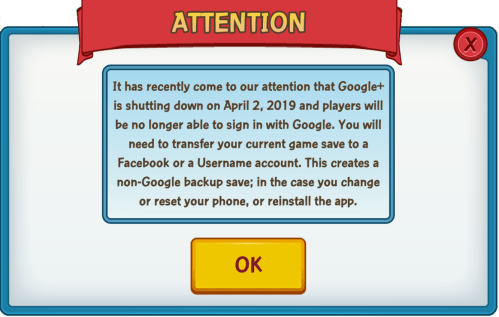
TinyCo recommend you use either the sign-in with Facebook or Create a Username option to now backup your game save, this will protect your progress in you ever change or reset your phone, or need to reinstall the app. Here’s what they say in their Help section:
“It has recently come to our attention that Google+ is shutting down on April 2, 2019 and players will no longer able to sign in with Google. You will need to transfer your current game save to Facebook or a Username account so you have a backup save in the case you change or reset your phone, or reinstall the app.
To transfer your game over to a Facebook or Username account:
-Go to the settings menu and tap on Account.
-Select Sign-In with Facebook or Create a Username. Both will prompt you to either sign in with your Facebook or Create a Username and password.
-After signing in with either, it will prompt you to either save your current game (Choose this one!) or create a new game.
Be sure to choose to SAVE YOUR CURRENT GAME instead of creating a new one or else it will result in losing your game.
Once you have completed all the steps, you will have a new backup set up, and will be unaffected by the Google+ shutdown.
If you have any other questions or clarifications, please let us know and we’ll be happy to help you“.
Where do i find my PLAYERID?
This is an easy one, you’ll find it in one of two ways.
- Located on the bottom right of the loading screen
- Located on the bottom right of the Account Info Menu
I hope this helps players who are currently locked out to join us again, and also will stop other players getting locked out in future.
~ Russian Tigger






 Family Guy Addicts
I believe u need to first be able to login using your saved game under Google Account then change your back up to non Google Account. Correct?
My game hangs whenever I start the new game form ground zero then log on to Google Account, simply not possible to access my saved game.
LikeLike
Yes, you’ll find what you need to do in thus post https://familyguyaddicts.com/2019/03/19/google-account-players-please-read/
LikeLike
Useful to know, sorry for jumping the gun but I’ve not read through your posts for a long while since I was prevented from logging on a year ago.
I reinstalled the app but a new problem. I can’t even open the app. Sent an email to jam city but looks likely not in time to remedy as it’s already April 2 today. Ah shucks. 3 years of hard work about to be flushed away, feeling melancholic now.
LikeLike
Welcome home!!!
There’s load glitches and issues going on, some are proving tough to fix.
LikeLike
Yes indeed, feels like a second home here with you around and some familiar users whom I remembered like Chris.
Good to see everyone enjoying the game.
LikeLike
Yes, some of us haven’t escaped for months like you 😅😅😅
LikeLike
I got prompted in my game to do this the other day. Hopefully I followed all the steps correctly.
LikeLike
hey @RussianTiger do you or anyone have any idea as too WHY they’re getting ride of the Google+ logins like i’m so curious as too why they gotta do that. if any reasoning at all i should say ya know what i mean
✨💫
LikeLike
It’s to do with Google closing down Googke+
LikeLike