
Hello Addicts!!!
Getting lot queries from players that they’ve launched the new Alternate Quahog feature but can’t do anything in Grassland. I think this might be because you are only previewing the town and not completing the purchase of it to unlock it fully,
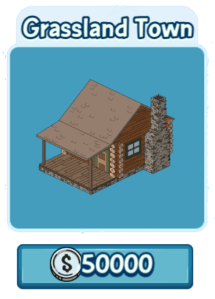 At part 3 of the Learn About Alternate Quahogs Questline you’ll be instructed to “Buy Grassland”. I think many of you are confusing previewing the town with buying it to unlock, so I thought I’d put up some information here to try help.
When you see Part 3 the Grassland will appear in your Alternate Quahogs to buy for 10,000 coins. You can see it by clicking on this Icon at bottom of your screen.

Then you’ll click on the Grassland town to buy, but tapping this initially does not buy it.
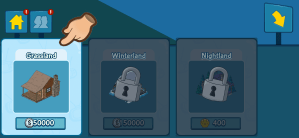
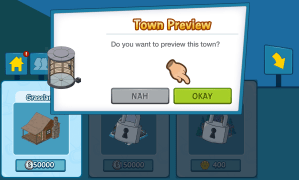
Instead it asks you if you want to see a Town Preview, click Okay to do so.
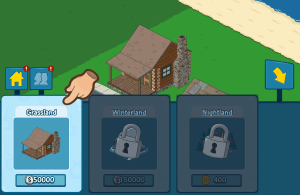
Again you’ve not bought it yet. But once your in the town preview, you’ll see a small block of land with a log cabin, workers Hut and some sidewalk but you can’t do anything else, that’s because as I say this is a preview, you need to tap the Alternate Quahog Icon again to bring up the available towns and there you’ll see Grassland still available to buy for 50,000 coins, tap it again and you’ll now be able to complete your purchase.
Once you do this you’ll get a pop up confirming you’ve bought this.

You’ll now be able to unlock blocks and place items from your inventory here, and purchases new items from it’s store content.






 Family Guy Addicts
Ever since the latest Update
My game is crashing …….. A LOT
LikeLike
I’ll keep an eye out for other reports
LikeLike
i contacted them and they said they cleared my cache but it won’t last 3 seconds before it crashes
LikeLike
Not getting any other reports as yet, can you give me more device details
LikeLike
i have iPhone 6
maybe its cz i placed the alternate quahogs machine ?
LikeLike
iOS 12.4 or smthg ..
LikeLike
i can’t . play . at . all .
LikeLike
Have you tried fresh install – obviously only if your game is saved
LikeLike
you mean delete the game and re-download ? i didn’t have to do that since I got this phone 2 years ago … and Yes my game is linked .. they just reset it for me …
LikeLike
Did it work? And yes I meant delete and reinstall
LikeLike
Ok thanks
LikeLike
It could be the Portal as it’s causing errors
LikeLike
i updated the game .. removed the portal and the van where the characters collect items for Winterland .. I just did fresh install and i still have the same problem !! 😦 😦 😦
i guess that’s the end … !!! this game is over for me now ….. 😦 😦 😦
LikeLike
Have you updated to 3.2.0 – do you have access to an android device to try see if you can play on that? Support are looking at this and hopefully Alternate Quahogs should go live soon, hoping that also may cure the issue
LikeLiked by 1 person
Yes I updated and after that I did a clean install like you suggested 😦
I don’t have an Android and I’m not shelling out about $1000 for a new iPhone just to play a game
LikeLike
Someone with an Amazon Fire having similar issues, can’t seem find anything to link the players having issues, random. I’ve brought it to supports attention again
LikeLiked by 1 person
i hope they fix it soon
i dont care about octopus meg
but if i missed out on disney lois i will lose it
LikeLike
Yup, I’ll keep on at them
LikeLiked by 1 person