
Hey there Lederhosens!
Back again for some more fun stuff. This is for those of you that like to use your Facebook to Play and also have the game on a Mobile Device.
I was messing around with my game on the Facebook Version of the App and notice Peter had a ! over him. I wanted to see if it carried back over, so I went back to my Mobile and it was still there. I tapped on it to see what happens. Some dialog went back and forth about Meg, the Mobile App, and more. Then there was a pop up…
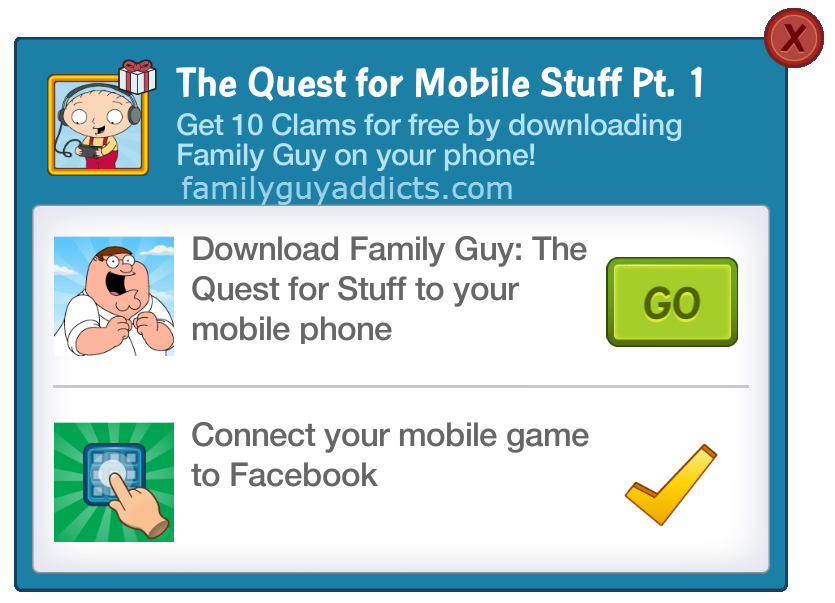
Again, this is triggered by playing the game on Facebook.
https://apps.facebook.com/playfamilyguy/
Here is essentially how it breaks down.
The Quest for Mobile Stuff Part 1
Peter Starts
Download Family Guy: The Quest for Stuff to your mobile phone
Connect your mobile game to Facebook
Completed Task Earns 10 Clams
I already have my game linked to my Facebook Account, so that was checked off for me. As for the “download to mobile”, I already play on my phone/ Tablets/iPod so all I had to do was tap on “GO”, which prompted a pop up about Mobile and the multiple platforms you can download it from.

I just X out of the screen and the Questline completed, then awarded me 1o Clams (in the form of an icon on the screen that I allowed the game to collect).
Oh… and there is THIS!! You’re Welcome!!!

There you have it. 10 Free Clams!!! This is all for basically playing the game on Facebook, Downloading and Playing the game on a Mobile Device, and having the game linked to your Facebook Account.
Did you already see this pop up? Did you link your game to Facebook? If not, are you going to try for it? Let us know.
~Bunny






 Family Guy Addicts
Still doesn’t load on PC while in FB,screen just stays on loading pic but loading bar don’t move , when I use the link giving on this site it shows loading screen but then I get told “problem loading app” then re-loads over and over till I get bored and kill it. Help please
LikeLike
What browser are you using?
LikeLike
I use Opera and havent really had any problems, except the last couple days but it seemed like all of facebook was having an issue for me
Also this quest popped up for me couple months ago when i started playing on facebook.
LikeLike
Well got the clams, and it opens in chrome, just none of the buttons work!! finger wiggles, but no actions. Had a hunt but couldnt find anything on it Not to concerned though as it works fine on the Ipad
LikeLike
Same problem here! Tried in Firefox or Chrome. Didn’t even know there was a facebook app, but clearly it isn’t working yet.
LikeLike
Unfortunately the game still won’t finish loading on my laptop. So i won’t be able to collect this. I’ve tried with google chrome, opera (which it said incompatible), safari, and I’m gonna try it in Firefox next.
LikeLike
Of course it worked in FF. It’s slow and gives me script errors bit i got my clams.
LikeLike
On iOS I had to take an extra steps. (1) Played Facebook game on laptop, opened quest, closed browser. (2) Opened the game on my iphone, opened quest, clicked button to open app download window. (3) Had to actually launch app store link. (4) Back to the game on iPhone again, at which point it finally recognized that I had downloaded the game.
However, the quest did award me the 10 clams, so I’m not complaining.
LikeLike
Dang my account is already linked to google play 😦
LikeLike
i just logged into Family Guy Quest for Stuff on my android phone and can’t see the 10 clam offer BUT I noticed if you go into the Main Menu there is an option under Inventory that says Music Codes and you can click on the artistes unlocked in Peter Palooza to get a FREE album.
I know Bunny had already told us about this but I was under the impression you had to downlaod teh albums during the event but that is not the case because I just got mine 🙂
LikeLike
I am linked to FB and on a mobile device and I don’t see any clams or ! anywhere
LikeLike
Did you go play on Facebook a while? The actual Facebook app while on Facebook on a PC?
LikeLike
My Facebook Family Guy Game on PC says it will not work with my browser (Internet Explorer), and that it will only work with Safari or Google Chrome. Is Yours working on a PC?
LikeLike
Chrome… but can’t do much with it. You just need it up long enough to access your game… then go back to mobile.
LikeLike
I tried Opera and it said it was an incompatible browser it said only Firefox, Safari or Google Chrome tried all 3 but none work. All say “Sit tight, we’re optimising the game for your browser!” and just hangs there
LikeLike
Sorry but I do not want my friends and family to know I play this game, lol.
LikeLike
That’s the beauty of a 2nd alt account 😉
LikeLike
You don’t have to post to FB. The only way they would know is if they play it too. They can’t really judge you.
LikeLike
Log in to Facebook > Settings > Apps > Apps Others Use > Edit > uncheck everything.
LikeLike
My browser will not work for family guy on Facebook either!;(
safari or google Crome
LikeLike
my browser crashes everytime i click the facebook version
LikeLike
I’ve never had any luck getting Family Guy to work on FB, but I thought I’d try for the claims. It took several tries and it never ran on FB (it kept freezing) but it worked. Thanks for the clams!
LikeLike
Have Meg in my pocket? Just Meg? 😉
LikeLike
Meg needs the love. Her parents are pretty awful to her.
LikeLiked by 1 person