
***UPDATE***
TinyCo confirmed this is in testing. In other words only a select amount of players will see this for now. Once done testing, all players will gain access to the feature.
Hey there Clammers!
With the New lil Mini Event dropped into our games, TinyCo also added an additional element of sorts that Players have been requesting… an easier to navigate Inventory Storage.
In this post, I will go a lil more in detail of just what all is involved in the Inventory Storage Changes.

As for triggers for this feature, I assume it’s like Character Finder, Inventory Character option, and Consuela’s vacuum. You had to unlock specific Districts to access them. Waiting for word back on THIS features trigger points as well as any other requirements. Will update post when I do get word back.
If you don’t see it, note below your device you’re playing on, current Districts unlocked to, # of open tasks, and if fully updated to 1.22.0
In meantime, this is what I see on MY Google device, all Districts unlocked, updated to 1.22.0, restarted device and checked to ensure update in place, and I DID trigger Peter’s tasks below as I don’t have many tasks open in my task menu bar.
First up, once you updated from your App Market to Version 1.22.0 go back to your game. There Peter will trigger TWO separate lil Tasks. Restart your device if needed to put the changes into effect.
Filter Yourself
Peter Starts
Tap on the Filter Button at the bottom left of your Inventory: Tapping on “GO” will take you into your Inventory to start this
Tap on one of the new filters: Pick any option to Filter whether All, Recent, or an Event
Completed Task Rewards:  20 & 10xp
Keep It Stashed
Peter Starts
Stash one or more buildings on your playspace in your Inventory: Just select ANY random Building in your Quahog and store it
Tap the “Recent” filter to view your stashed building: Tap on the “Recent” option in Inventory and you should see the item you just stored
Completed Task Rewards: 30 & 15xp
HOW DOES THIS WORK?
Essentially, this is a way to find something you placed into your Inventory a bit easier. It could be anything from a Decoration, to a Character, to a Building, an Event item, or something you know you just placed there.
It is really cool.
FILTER INVENTORY
For an example, I will show you my Inventory using the New Filter Options. First, I will take you to the Inventory.
You can get there two ways…
- Tap on ANY item and hold it until the screen goes into movement mode, there you will see the Inventory Icon in the lower corner. Tap on the Icon to go to Inventory.

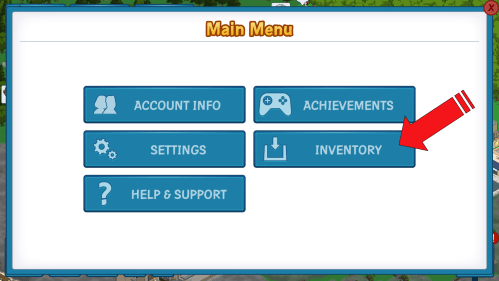
 Tap on the Menu Icon in the lower left of your game screen (looks like a lil blue cookie). Select the option of INVENTORY.
Now that you are inside of the Inventory Storage you will see the NEW “Filter” Icon at the very front, far left. Tap on it to start the “Filter” process. It defaults to “ALL”.
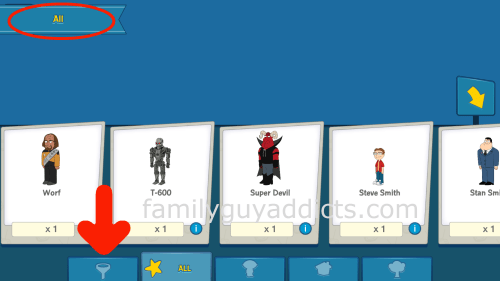
EXAMPLE FILTER EVENT
Now that you are to the Filter Options, let’s pick an Event to use. The Events I see in My Game to Filter are as follows…
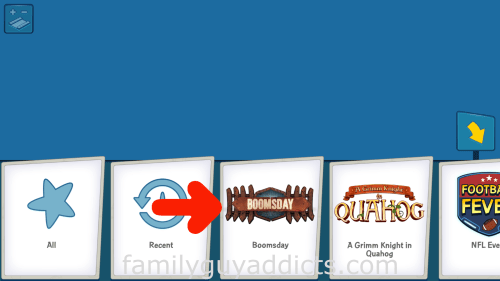
- Boomsday
- A Grimm Knight in Quahog
- Football Fever
- Raid to the North Pole
- Death at the Drive-In
- PeterPalooza
- Fatfather
- Star Trek
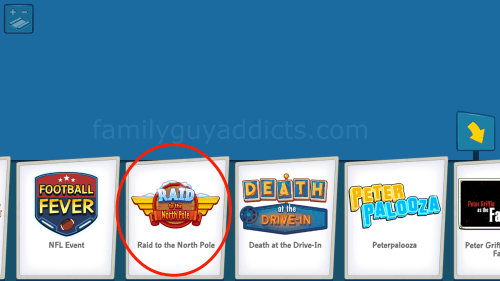
For this Example, I picked Raid to the North Pole. Tapping on it takes me first to the “ALL” option. You will notice up in the top Left Corner it will list where you currently are.
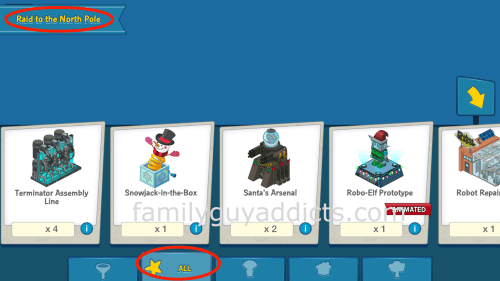
From here, I can go to the Individual options to Filter the Raid to the North Pole items even further to specific groups.
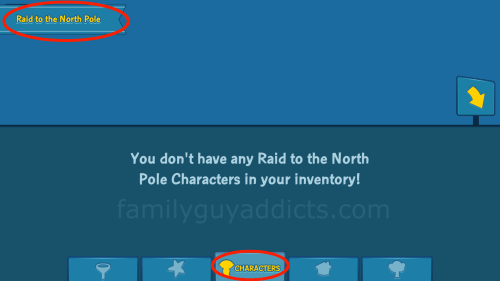
Characters: As you can see, I have all my Characters in Tan Lines Resort so my Inventory told me “You don’t have any Raid to the North Pole Characters in your Inventory!” You will see this anytime you do not have any of the Item you selected in Inventory currently for the Filter option.
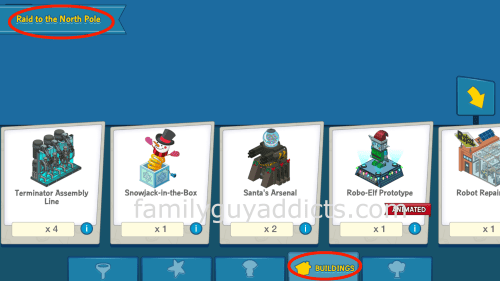
Buildings
Decorations
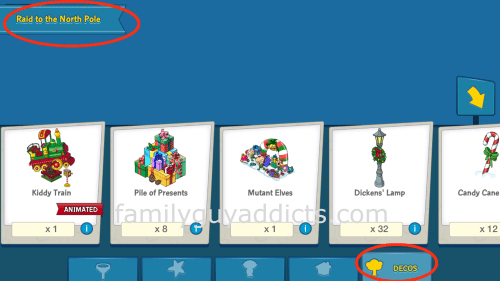
EXAMPLE FILTER “RECENT”
The other Filter Option available is “Recent”. It is really just that. Items you RECENTLY placed into Inventory. I assume within the last few hours to 24hrs, but I am still testing it as it just hit the game.
Same concept as above to get to Inventory, this time… selecting “RECENT” filter. (Looks like a timer.)
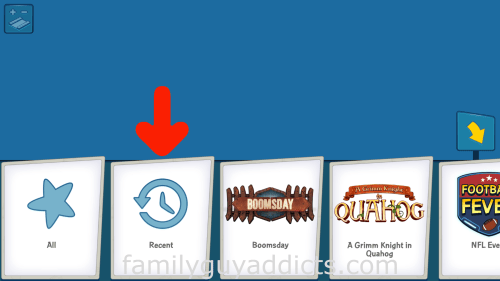
I had just placed the School Bus House from the Boomsday Event in the Inventory, so when I went to the “Recent” option, there it was.
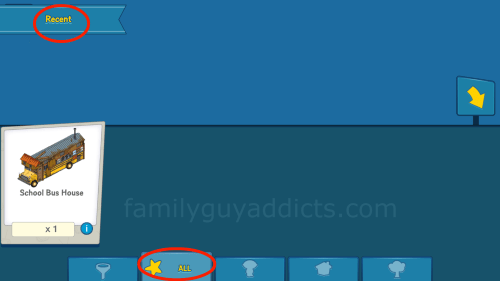
There you have it, a way to find things a lil bit easier in your Inventory. Yes, I know not ALL the Events are there. May be a space issue… but it least this is a step in the right way again. WOOHOO!!
What do you think of the New Inventory Options? Tried playing around with it a bit? Thoughts? Suggestions? Let us know.
~Bunny






 Family Guy Addicts
I really like the new inventory filters. They have added district filters and a misc filter (Stan Smith is the only thing in misc at the moment but I don’t think there is a filter for the American Dad stuff yet) since I last looked. I’m interested see what other filters we get ☺
LikeLike
They’ve added filter for a few more events as well as one each for every district other than Tan Lines.
LikeLike
Yep, good to see more events and districts added. They’ve added Comic Con yet not Miracle On Spooner Street; hope they continue and include all the major ones still missing.
LikeLike
I don’t know where to offer feedback to TinyCo, so I’ll drop the comment here for now since I know they sometimes read the comments on your very helpful site.
1) Thank you!
2) How about a non-event filter? Something that only shows items/characters/buildings from the basic FGTQFS Acts.
LikeLike
Same as an issue… you can always message them. I also have the “Dear TinyCo” posts too. Below is the most recent
🙂
LikeLike
I hope they keep adding to this, because it says something about filtering by events AND districts…mine doesnt have a district filter, which would be GREAT for helping to organize the ‘core’ game inventory. 🙂 A great little feature – good job, Tiny Co!
LikeLike
Got the new filter system, makes things so much easier. I’m forever nuking and rebuilding – which took forever scrolling and scrolling through the inventory pages. I do like how TinyCo listen to their players even if it takes a while to implement changes.
LikeLike
Hi. Just a heads up. I seem to be missing about 25 characters with the new filters update. Hopefully they will show up soon.
LikeLike
? Are in in the actual Filter area? Or in the Original area. The “Filter Area” as noted above, only shows specific Events. Not ALL. You will need to exit out of it and go back to just the regular inventory to see it all.
LikeLike
This is a step in the right direction but I love to see them add a search option or the ability to sort alphabetically. It would help a ton when you’re looking for a specific building required for a task. I can’t tell you how many times I scroll past them before I find them. My vision starts to go a little fuzzy after the first 20 pages!
LikeLike
This is a welcome improvement but needs to go back further than Star Trek and really, would it kill them to implement a proper text search? I’m glad they listened and acknowledged the problem!
LikeLike
It’s definitely a good thing to have added with how cluttered our inventories are, but I’m a little disappointed to not see a “Classic” filter option in the list. All they’ve got thus far is event filters (which is cool since each one has its own logo that’s used). So while I can go and grab that Barrel of Tweeters or whatever from Thanksgiving, I can’t easily find that “Gay Pride” parade float to put behind a flash mobbing George Takei.
LikeLike
How do you mean “classic”?
LikeLike
Things from the base game itself like chain link fencing and whatnot.
LikeLike
Hey bunny
My game not working, I have tablet 😦
I want to unlock characters , items too
LikeLike
What isn’t working? Is there a message?
LikeLike
Nope !!!!
LikeLike
Yep, did the update and up popped Peter. It’s an awesome feature. Makes it so much easier to finds items.
LikeLike
I am new to the game. One month old! Still navigating my way around and found the way to get characters by getting stuff (rare, uncommon) is a pretty tough way to play, as compared to TSTO.
One burning question – How do you store characters? For example, I have the Blue Mutant from the Mystery Box from the recent event walking around. I want to store it but cannot find it to store. Buildings are possible but not characters.
LikeLike
I believe… district 4 or 5 is when item storage feature comes into play. When it does, just tapping on an item like the Mutant would pull up its name and a teeny tiny box with the Inventory Storage icon. Tapping on that lil icon will store it.
LikeLike
Hi bunny, i tried searching options in either inventory or tapped on mutant but no little icon. Could it be that non characters like mutant cannot be stored? I am at district 4 just unlocked joe and herbert.
LikeLike
Like I said…I wasn’t sure exactly District it opened as it’s a feature they added after the game was out a while… just keep playing and it will eventually. Then your “Walking decorations” can be stored
LikeLike
Thanks Bunny. Guess I am still fixated by the simple gameplay that TSTO offers… FG seems to be a tougher play, especially collecting those rare items within a limited time period to unlock certain characters. I would love it if they are unlocked by following quest lines. Oh well.
I will keep on playing. Appreciate your keeping us updated on this site! Must be tough managing a job, 2 games and 2 addicts-sites!
LikeLike
🙂
It is a bit of a chore, but I try to keep this site active as I know players are still out there seeking information.
LikeLike
The ‘grind’ is kinda why I like FGQFS, TSTO bored me – tap this, tap that blah blah blah…. With this game, I actually have to think and strategize. Yeah I can get moody with the game at times, such as my disappearing nutcracker truck thing at xmas but TinyCo fixed it. Events stressed me at first because I couldn’t get every character but in the almost a year I’ve been playing there’s been loads of re-releases. The game’s not for everyone, but as you said, stick with it 🙂
LikeLike
I absolutely love the new filter. It is easy to use and will help tons with finding a particular building or deco!!!
LikeLike
It’s weird, I had the feature at first and then it disappeared.
Oh well, fun while it lasted!
It’ll be nice when it’s here to stay!
LikeLike
I absolutely love this! All the items are sorted by event!!!
Since I have so many coins already, I don’t really need the rent.
So I was able to dump most stuff from the last three events in inventory, then easily pick and choose what I wanted back out.
As a tool to get users to utilize the inventory more, it worked on me!
LikeLike
I just got the new feature. My only problem is it doesn’t have all the events for filters. I assume it’s because it takes time to sort and code if it’s even possible for the wicked old stuff. But still awesome
LikeLike
I have the filters. Great idea. I think it will help a lot. I hope it goes further into the past before they are done with it.
LikeLike
This popped into my game about 7PM est. Love this new feature. I have been playing for a couple of years and have a huge inventory.
LikeLike
Working in both my towns now!
LikeLike
I hope this Update on Evening please 😀
LikeLike
I have not seen this feature yet. I currently play on the iPad mini. Interestingly from your list I am surprised they did not include older events like comic-con or Halloween 2014 or one section dedicated to mini-events only. Maybe we can ask TinyCo. to include these as well since I still enjoy some of the older stuff but I hate trying to scroll and find them.
LikeLike
It’s in testing
LikeLike
Obviously, Bunny, as if we and she didn’t know, is special.
😉
LikeLike
I’ve updated to 1.22.0, have all districts unlocked, only 2 tasks open, and still doesn’t trigger Peter. It does say “All” when I open inventory, but there’s no other options. I’m using Bluestacks for mine.
LikeLike
Have seen your update to the post. Thanks!
LikeLike
I can’t find it on my game
I so I can unlock characters on the box
LikeLike
So, since this says all districts unlocked…does this mean I won’t have this until I have the Tan line District unlocked?
LikeLike
See top of post
LikeLike
Thank God …. complained about how to find things.
Yay!
Thank you
LikeLike
I don’t see the filter yet, just the banner that says all. I’m playing on an iPhone 5S, updated to 1.22.0, currently working on district 9, and I have 16 tasks in my bar, which may be the issue but I’m working on clearing those. Thanks 🙂
LikeLike
Peter did not started the quests. I have only three quests in my inventory, the app is updated. When I open my inventory, the button to use the filters is not available, but on the upper left corner it shows the flag with All writen on it. I’m running the game at iOS
LikeLike
No sign of this on my iPhone, fully updated and all districts unlocked with only 4 tasks on the go currently.
LikeLike
Hey bunny, this has not been triggered in my game as of yet. I have all districts unlocked, including Tan Lines. I’ve updated to the most recent version and i have six questlines open.
LikeLike
Not showing on iPad Air or iPhone 6 on latest iOS. All districts unlocked, 3 items in task bar, fully updated and restarted devices.
LikeLike
I don’t see this feature I’m playing on iPad Version of game is 1.22.0 all available districts unlocked
Only open tasks are Back to Jolly farm Pt 2 Return of Mrs. Stewie Pt 1 and Saving the End of the World Pt.1
The last one should have dissapeared with the reset as it is to Create the Apocalypse Peter Outfit and it’s not available in Al Harrington’s
LikeLike
Still no funnel icon for me, just the character building deco strip underneath and the ribbon in upper left. iOS 8. No tasks about the inventory in my list. So it looks as though I have a partial filter but not the whole thing yet.
Started the brewery district long ago but just bought a lot of useless junk at the brewery from collected materials (no little orange people wandering my town yet). Not finished with useless junk apparently. Not to the ghost district yet. I did some blimp/plutonium thing long ago with Stewie and Brian. The close spacing of events has kept me from diligently pursuing such things. Or remembering them….
Open tasks: more than ten thanks to Peter and Lois always being busy…
– 2 for this event (main plus Penelope) – should there be one for mother Maggie, whose trailer is built and she’s placed?
– 9 for Boomsday (got a lot of new characters/skins)
– 1 from wrestling (Maxi)
– 1 from Santa’s North Pole event (Snake)
– 1 from the Li’l Peter/Li’l Giant Chicken event (Peter)
– 1 for brewery project (with brewery pic)
– 1 for Tanlines project (with the resort building)- I’ve only done a few daily quests and unlocked two floors filled with vacationing characters, so only the key collection task is checked off
– 1 clams for coins thing that is probably very old, I don’t buy anything with realspace money
17 tasks if you count the clams one. Maybe they should do what TSTO did recently, provide a box icon for old task that we can open when we have time to work on them. That’s how I clean off my desk in realspace: 1. Shove everything into box. 2. Stash box and forget it exists. 3. Find box ten years later. 4. Toss everything since obviously I haven’t needed it in ten years. Except money, if I find some. (Yes, I did…)
If I’m missing a Mother Maggie task, that would support your idea that too many open tasks prevent others from arriving. I’ve already cleared at least two, maybe three tasks since Boomsday ended. It will be a while before I can declutter more because all the same characters are needed. I’m on part 3 of some, though. We used to be able to trim the list between events, but that was when there was time between events.
LikeLike
Mother Maggie’s task popped up and I still have 16 tasks… I doubt that the number of tasks open would matter for this- the new tasks are just a way to show you the inventory change, to make sure you know it’s there and how to use it. You should be able to just directly go into inventory without a task to guide you, once it’s available to everybody. Remember how long it took for clam TV to become widely available, they tested it with a much smaller number of players first.
LikeLike
I have current district unlocked. Game updated iPhone but no filter update so guess it will come eventually
LikeLike