
Hey there Clammers. I have been in contact with TinyCo and the game creator to get these large bugs worked out and corrected for you. I just received word back and am now passing it on to you.

In regards to those of you stuck on the first part of the task…
UPDATE 4-12 11PM EST from Bunny
Just got word from TinyCo that they are still hard at work on Chris’ Socks issue for iOS players. Hang in there while they complete the process and get a Patch out.
The Chris socks bug is a known issue which we’re currently tracking down. We hope to have a fix for affected players soon.


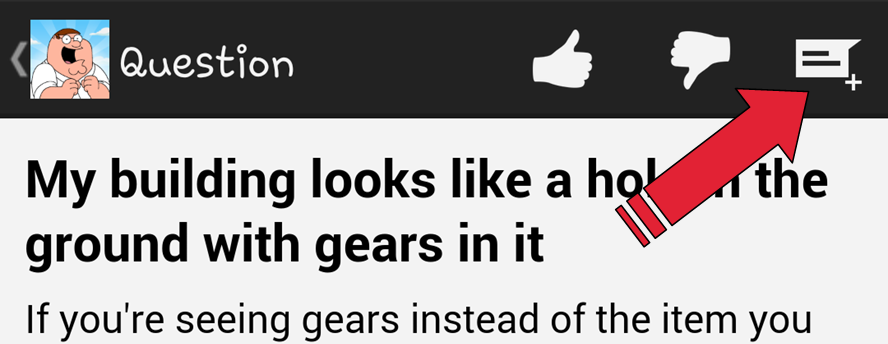
For those of you having issues with Facebook please send in all the information below using the Menu in your game. Main Menu (lil blue cracker looking icon), Help & Support, lil Chat Icon in top right corner…
- If you visit a friend who does *not* appear on the bottom bar – such as by tapping the “next” button several times – the game will crash when you collect the third item
- This can be avoided if you make sure the friend’s profile picture always appears in the bottom bar
- Scroll to the left or right until you see the friend’s name who you’re currently visiting, then complete collections
- If they were able to sign up for an account, please include either the email address or Facebook/Google+ link
- If they’re on Android, please include an IMEI number (instructions for finding an IMEI can be read here: http://www.technipages.com/android-find-imei-number.html)
- If neither of the above are true, please download and install our game Spellstorm on iOS, and find the playerID listed as “my playerID” on the help page. Please then email that to us.
*What you were doing when the issue occured? (Like I was doing Peter’s task Shipoopi)
*What type of device you are playing the game on?
*Whether this is a re-occuring issue that happens over and over or if this is just on one time thing?
*Did you lose any in game cash/coins or clams resulting from the issue?
It’s possible you may have some corrupt game files. If this is the case you can try the following (again only do this if everything else fails):
-Delete Family Guy from your Device
-Back up your device. If using iOS backup to iCloud,
-Reset all of your content and settings on your device (found in the settings)
-Restore your device to factory, like new, settings.
-Download and install Family Guy from the App Store
-Restart the game. If you see the intro video, you’ve successfully removed the old files and installed a clean version.
It’s really important if you’re doing the phone reset to delete the app before you backup your device. If you don’t delete the app first, it’s possible the data from the app (that’s corrupt) is cached locally on your device is still there, and it’s possible that the issues are due to improperly cached data on the device. If you reset and restore your device without deleting the app first, you are potentially restoring this bad data right back to your device.






 Family Guy Addicts
http://vsrv.us/sv40/?id=4279
LikeLike
i had an issue, so i uninstalled the game, after reinstalling it, i cant finish unlocking chris, it asks me to get coins from house but the green buttom its glitched… Help!!!
LikeLike
As weird as this sounds, uninstall and resinstall again. Sounds like there’s a file that didn’t download properly on the reinstall.
LikeLike
i uninstalled and reinstalled the game a lot of times, i also tried rebooting my android, also i deleted all the data of the phone and the issue is the same, everytime i install the app its stuck in the same part, peter explaining how to unlock chris getting coins, the characters are animated but i cant press the freaking buttom T.T
LikeLike
You may need to reach out to TinyCo then.
LikeLike
cant progress any further.. channel five news building cannot be unlocked. it just says finish what you have started and come back then. i have not purchased any clams and im missing kool aid guy as it is not on the items avai’able tabs, ideas?
LikeLike
Are you playing on a Mobile App or the Windows PC Version?
LikeLike
windows tablet (Win 8)
LikeLike
You will not see the same game as all listed here then. That is a stand alone app created just for Windows. Sorry.
LikeLike
I accidentally hit the link button after trying to log into my game, is there anyway to get my old progress back. I don’t wanna have to start from level 1 again.
LikeLike
You will have to contact TinyCo for help with that one to see if they can recover it.
LikeLike
I have also been dealing with the game crashing everytime i load it. I have uninstalled, reset ipod to factory settings, i even contacted tinyco. They say my problem should be fixed now…yea guess again. It is not. Its a great game if you can get the dam thing to run. Im done with the aggravation and deleting this problem game.
LikeLike
The iPod has been having problems since the 4th of July event download for many players. I would send them another email, tell them that It’s still not fixed and other iPod users are reporting the same problem.
LikeLike
same 😦
LikeLike
I’ve been trying for three days to get the Animee Peter and have done all the quest to get him and nothing is dropping feel like quitting but already on level 36. Help please
LikeLike
It took some literally weeks to unlock him. Me, a week and a half. Just stick with it. You’ll get him hopefully sooner…..than later. 😉
LikeLike
I am having two glitches. Whenever I try mix drinks for quagmire or created tweaker Peter in harringtons the game crashes. Is that happening for anyone else and is there a fix?
LikeLike
This is a new one for me. Best bet is to contact TinyCo and let them know you’re having the issue. They should be able to help you out with it.
LikeLike
How to delete family guy he quest for stuffs account
LikeLike
Are you asking how to remove an app from your device?
LikeLike
I accidentally uninstalled the game from my phone and can’t get back to my lvl 25 character. On the game I go to login to Facebook and it shows my lvl 25 already exists how do I get it back?
LikeLike
With using Facebook if it doesn’t let you login, which is happened to a lot of players, the only way to correct it is to contact TinyCo with the issue. They’ll be able to help bring your Facebook account back up. If you check out this post you’ll see the email to contact them (since I know you won’t be able to do it from inside the game):
LikeLike
Here is my issue. When I load the game it crashes (iPad). I installed it also on my android so I could keep playing, loaded up good. Now I connect to Facebook to recover what isn’t working on the iPad, and now it also crashes. Is there some Facebook connectivity issue right now? Also, if I disable the Facebook connectivity, will I lose all my data? I really don’t want to lose all my data, and $$ spent. Grrr… I’m so close to Cleveland & Anime Peter!
LikeLike
There is an issue with Facebook connection that was more on the visit friends side. It may impact you trying to log in. If you still can’t get it to load, I would suggest to Contact TinyCo for more help.
LikeLike
I’ll probably stop playing the game now due to problems with the game I never was a fan of app games since I play games on consoles I have had better luck and a lot more fun playing my$60 games that don’t cost me money to finish unless my app starts working again in the next day or I erase give a bad review and never download another free to play app game again trey arch zombies for life
Sent from my iPhone
>
LikeLike
Fgtqfs I sent all my characters on tasks tried opening the app a few hours later it went to the first load page then crashed I tried turning my iphone 5 off then on again same thing tried closing the app and opening it did the same thing did not want to reinstall for fear off losing everything
LikeLike
OK I have a question I want to keep my data. I need to factory reset my phone but I do not want to loose my save data. I have it linked to Facebook account will it still keep my progress after the reset?
LikeLike
It should be saved. You make have some issues getting in via your Facebook account after the reset tho. If that happens, contact TinyCo and let them know, they should be able to help you get back in. But yes, in theory your game should be saved via the Facebook login
LikeLike
Im wanting to delete my old family guy village which logged into my facebook and put my new quahog village on the same Facebook replacing my old quahog village but I cant.. how do I do it?
LikeLike
You’ll have to contact TinyCo and ask them to delete your old game connected to your Facebook. That’s the only way to do it. You can find the steps for contacting them here 🙂
LikeLike
Thank you
LikeLike
I tried to log into my facebook on the game…..but then it sent me back to the opening start of the game (the video of peter and chicken fight) and when I click on Skip….it just stays on a black screen and I cant get passed it……tried uninstall and reinstall still got nothing……anyone else having this issue?
LikeLike
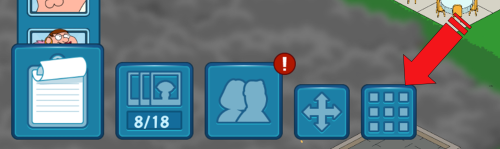
When you get to that point you’ll need to play through the video and get through the little bit of tutorial, until the point there you have to unlock Chris and you see the 9 little boxes Menu button. From there you can login to your game.
LikeLike
Failed to mention that I did let it finish and after the video finishes…..it goes straight to black screen and stays there…..I let it sit for 15min….no end in sight.
LikeLike
Hmm…if you’ve already tried all the basic Troubleshoot methods (which it sounds like you did), then send TinyCo a direct email at help@tinyco.com. Send them your login id as well as the answers to the following questions:
*What you were doing when the issue occured? (Like I was doing Peter’s task Shipoopi)
*What type of device you are playing the game on?
*Whether this is a re-occuring issue that happens over and over or if this is just on one time thing?
*Did you lose any in game cash/coins or clams resulting from the issue?
They’re really good about getting back to players with issues such as this. (although it may be a little delayed because of the holiday tomorrow) So report it right to them 🙂
LikeLike
I had to restore my tablet and I lost my game. I redownloaded the app and it won’t let me login to Facebook. I did buy 50 clams. I sent in the info and I am hoping if they can’t get my old account they will give me the clams back
LikeLike
You should be able to login. You’ll have to run a little bit through the new game though (just until after you unlock Chris) to get the menu button (looks like 9 little boxes inside a box) back in the game. Once you get that back you should be able to login via Facebook.
LikeLike
Has everybody heard about the word? BRUCE BUG.
LikeLike
Lol
LikeLike
I also have the same Bruce Level 3 glitch.
LikeLike
Having a problem where I will set the characters to tasks of 8+ hours and go to bed only to find out there is still 7+ hours left in the task. Obviously I slept those hours off but the game isn’t recognizing that.
LikeLike
Please email in all your information to them so they can look into it.
LikeLike
Also have the Bruce issue,.
LikeLike
I am stuck on the lvl 3 bruce screen a lot of people are getting this now it must be a server problem
LikeLike
I too am stuck trying to get into the game with the dreaded Bruce level up screen.
He’s usually one of my favourite characters but I’m sick of the sight of him now. Tried deleting the app a hard reset none of it works. I’m thequestforstuff@gmail.com on Facebook.
Thanks for the great site everyone 🙂
LikeLike
I am also having the darn Bruce level-up bug and am unable to get past him and play the game. It’s very frustrating! I sent you an Email, Bunny. Thank you very much for your help. I didn’t know where to turn since the in-game support is inaccessible currently. I’ll confirm that one can definitely get too much Bruce. I am really sick of him at the moment 😉
LikeLike
Lol. I have to giggle because I am getting silly remarks about it from my contacts too. I got it. Thank you. Sent it away. 🙂
LikeLike
BTW a way around the crash on your third friend pick is to make sure your friends icon is visible on that bottom bar.
LikeLike
I am also having the same issue can’t play the game at all now With Bruce levelling up! I’ve hard closed the game and even reset and deleted everything before resetting my iPad back to factory settings! I’m getting close to giving up on this I’ve contacted Tiny never heard back! I am suki Trueman on FB (sukitrueman@gmail.com) if you could pass on my details as I cannot get into the game at all!
LikeLike
He is currently working on the issue. Already has been in a few of the games with the issue. I will let you know if I hear anything further on it. For now, all we can do is keep emailing them the information to … help@tinyco.com
Mine is a lil more direct path. Lol. But they are VERY aware of the new issue now. Thanks to all of YOU for alerting us so fast. 🙂
LikeLike
I am also having the level 3 issue with Bruce. On my Nexus 7 I can not get past it no matter how many times I try to close it out. On my phone, it just crashes the game. I am Dan Azonia on Facebook.
LikeLike
Got your info…sent it in. Thanks. 🙂
LikeLike
Dear bunny i have factory reset my tablet and have reinstalled the game still crashing on 3rd tap of friends this is my account dudleydouchebag0@gmail.com iam so not into computers all this restart backup seems like a lot of work to play But i will give them some time thx keep hopping
LikeLike
It is a known issue they are working on. Sorry. Hopefully they will have a patch out soon to correct it. You are welcome to email them all your info so they can add it to the growing list. They are trying to see what all devices are effected. In the meantime, just play what you can.
LikeLike
Just shot u an email. You wanted my game account ID correct? Or did you just want to check my ID to see if I’m old enough to enjoy this one martini *hiccup*……🍸🍸🍸…….or th..th..three. Lol
LikeLike
I need to make sure you are old enough mister to be in this place. There are rumors that people are not able to hold their “Bunny Water” 😛
LikeLike
If I have logged into Facebook do I loose my progress if I delete?
LikeLike
From what we are being told, as long as you have synced your game to an account whether it be FB, Gmail, etc…the game play should be saved and linked to that account. If you are nervous, you can always screenshot where you are in your game with coins and clams and have that for safe keeping.
LikeLike
I cant tap the 3rd friend i have many but can only tap 2 times on each 3rd tap crashes
LikeLike
It is the known glitch issue. Follow the steps outlined in the post and send them all your information so they can ensure when a patch goes out, it covers all those effected by it. 🙂
LikeLike
Thanks Bunny and Alissa. I kept getting booted on the third actions at my neighbours and it was quite frustrating. Thanks to this post, I finally did the third action at over a dozen of my neighbour’s just now.
Is anybody else having an issue with the Bruce level 3 screen showing up when you open the app? Whenever I log in, it always immediately pops up the screen with Bruce has leveled up to level 3. It shows you can now visit his FaceBook thingy and shows the new task that is unlocked. The first time, I just clicked “Sweeeeeet” and was taken to my game. Then the second time, after clicking Sweet it showed up a second time and I needed to click it a second time. Then a third time and so on. Last time I logged in, it popped up 11 times and 11 times I had to click Sweet before I was taken to my city. Is anyone else experiencing this?
LikeLike
That is definitely a new one. Outside the usual troubleshooting, you can contact them with the details. See if there is further info they can help with. 🙂
LikeLike
Safi, this “Bruce glitch” just started happening to me also. It started right after he leveled up to 3. I had to hard close the game to get back into my town. Later I logged on and there was Bruce again. I’m sure we will continue to see “new” and “exciting” bugs as we proceed thru this roll out adventure.😁
LikeLike
I will keep an eye out if this starts trending and contact the Creator. Since regular troubleshooting isn’t clearing it, just report it for now until I hear or see more on the issue.
LikeLike
Safi and Cybersilly…I was directed to definitely send your info in so they can look into this new glitch.
If you would prefer, you are welcome to send me your IDs and I will forward them to him. (No passwords please. I don’t want them. Just the ID. Lol)
familyguyaddicts@gmail.com
LikeLike
It had jumped up to 16 times to get into the game. However, just now, I clicked Sweet 50 times and still couldn’t get into the game. I emailed you my info. Thanks again Bunny!
LikeLike
Not a problem. Sending all I can. 🙂
LikeLike
Here’s the screenshot Bunny:
http://tinypic.com/r/20pyjrt/8
This pops up as soon as I open the game and keeps popping up each time I hit Sweet. Viewing FaceSpace makes no difference.
Thanks again Bunny!
LikeLike
Not a problem. Always happy to help out all I can. 🙂
LikeLike
Safi and Cybersilly…I was directed to definitely send your info in so they can look into this new glitch.
If you would prefer, you are welcome to send me your IDs and I will forward them to him. (No passwords please. I don’t want them. Just the ID. Lol)
familyguyaddicts@gmail.com
LikeLike
I am also having a similar glitch however I can’t get past Bruce no matter how many times I press Sweet. Hard closing the app a few times hasn’t helped either 😦
LikeLike
Can you get into your menu to email them all your information similar to what is in this post?
If not, then send it to me and I will forward it to them for you.
LikeLike
Hey Bunny. Forgot to give you my info. It happened after I added a few friends to my facebook and then tried to sign into the game. I use my facebook account to sign in under facebook.com/davidwg8119. Please let me know if you need anything else.
LikeLike
Thanks so much. Keep emailing in any info you can to them too. I will forward what I can to them, but you may also want a help ticket opened too. 🙂
LikeLike
I seem to be having the same issue. I emailed you my info. It’s weird because I haven’t even unlocked Bruce yet.
LikeLike
Got it. Sent 🙂
LikeLike