
Hey there Holiday Humma’s!
Bouncing by really quick to go over some things I am seeing in the comments over and over. Take a peak below and see if these issues apply to you.

First up, the Basics of items you need for the Christmas Event in the games right now…
- You need to be playing on an iOS, Android, or Amazon Device via Mobile App. (There is also the direct Facebook Game App.) The Windows Stand Alone App does NOT play like the Mobile App. It is only a basic game and NO EVENTS. Districts 1-8 ONLY.
- You need to be on Version 1.15.0 in your App Market. If you are not, you will not see any of the Event at all. Kindle users, do a manual search for the Family Guy Game in the Market to locate the App and Update it. Don’t use the game to find it.
- You need to be to at LEAST District 3 game play and have Al Harrington’s unlocked in your game.
PLAYSPACE ROAD TEXTURE GLITCH
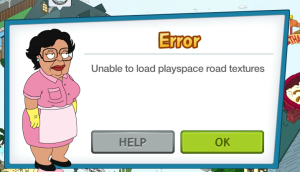
The Consuela Error popping up “Unable to load playspace road textures” was supposed to be resolved last night. Per TinyCo Force Closing and/or restarting your game should have fixed it. It is still plaguing some Players though. I did report it to TinyCo and still awaiting another update on it. Will note here when I do. Hang in there.
This game takes a LOT out of your device. I am not joking at all… A LOT. That means in order to play this game in a smooth manner
- You will need at least 2-3GB of available space in your device for the game to have “wiggle room”
- You will need a solid internet connection (I would suggest WiFi as it is usually more stable and no Data usage)
- NO OTHER APPS RUNNING- if you have multiple apps running on your device they will fight for the connection and RAM. This is not good. It will cause the game to crash, a lot. So close and kill all apps before launching this one.
- Non crowded Quahog. Too many items in your game will cause too much RAM usage on your device and create a disaster of lagging, glitching, and crashing over and over and over. Store things away. Especially animated and moving things. Don’t overcrowd your town and the game will run a bit more smoothly.
All that being said, I do know some specific iOS users are stating crashing outside the normal things with this Update. Already reported it to TinyCo and awaiting an update. Feel free to message them from your game too if you are experiencing this and the items above do not apply to you.
TEXTURE GLITCHING
Like noted above, at times the game will struggle and “freak out” with the textured areas. I have seen this now with several Events in my game. The Event area as well as other areas have “shattered” pieces of texture all over in random spots. No worries, it will not impact your game play. Usually a restart will resolve it.
You can see in the image below what I am talking about, “shattered” images of the tree line all over the play area.

There you have it, outside the usual daily things I see on Crashing and Glitching… Consuela is really the only “Error” I am seeing right now. Hang in there if you are experiencing it while they look into it further.
~Bunny






 Family Guy Addicts
I send my santa to destroy the village but it shows he cant destroy any village an doesnt collect rewards…its been two days it keeps showing an X over the village an humma
LikeLike
Did you tap the X?
LikeLike
Santa disappeared 3 days ago had him since last Christmas. Tried uninstalling and reinstalling ; even tried contacting support. Nothing works. Cannot do much with just peter attacking. Arrggh…its just a game…its just a game. OK I feel better now.
LikeLike
Is he in the Base Tent in the North Pole?
LikeLike
My Santa also disappeared. Anyone figure this out?
LikeLike
LikeLike
Thanks bunny, I’ll just keep a check on it. The building that houses my hovercraft deal (whatever attacks the toy village) has now disappeared as well, but I think that’s also addressed in the link you sent.
You’re a cute one by the way.
LikeLike
Mine too
LikeLike
I keep getting an error message saying that that there was a problem loading the save game, some placeables are out of bounds. I have email tiny co about it a couple of times and haven’t received a response. this happened to my boyfriend too. we had both built the blimp for stewie and sent him and brian on a mission, then this error popped up. can’t even get into the game. un-installed it and re-installed it, nothing. have you heard of this? we’re stuck and can no longer play, we love this games.
LikeLike
Is it the one on this page?
LikeLike
i just defeated my second building with the humma. my rewards popped out and the hats (supposed to be 12 hats) flew to the top right of the screen . when I went in to the present icon to get more gift boxes from hats, my hat count was still 6. I closed the game, reloaded the game. my humma is now on the third building but my reward from the second building is MISSING.
have you heard of any glitches on hat counts ?
LikeLike
I’m experiencing the same problem. Collect top hats and then they are either not recorded or disappear from my inventory.
LikeLike
Does this happen while playing? Or if you close your game after collecting and return as if you never did?
LikeLike
I’ve been struggling and googling everywhere. I can’t figure out how to earn grenades and presents. I need the grenade to make camo Peter to drive the jeep but it says to get them from the naughty or nice place. But I need presents that are bought with top hats that come from Santas village. But my Santas village doesn’t give out top hats. I’m so confused.
LikeLike
Go to the Main Post first, there you will see the main rundown info.
The game is set up in a way that you hit “Levels of Play” during an Event. You need to do one thing first before doing another. Santa will do Humma Battles just fine and get you hats to get you presents. So focus on that first, then when you can unlock the building that will help with the drops, you can work on the grenades.
These Events (and this game) are paced so you don’t unlock everything all in one day and actually have to play the game to progress. Just keep going and you will get there eventually. More info coming soon on Humma Battles.
LikeLike
I have a droid turbo, and the Google play store says my device is not compatible for the upgrade. Is anyone else experiencing this? Is this something that can be fixed?
LikeLike
You can message TinyCo for more details.
LikeLike
This is probably the millionth comment on this topic, but…. I am playing on an iPad mini, and until the latest update, have never had this crashing issue (that makes gameplay impossible). I have done all of the suggested tips and tricks, up to and including deleting the game and reinstalling it. No change; my game crashes after approximately four minutes and doesn’t save anything that I do in those four minutes. Therefore, I can’t advance in the game. Has there been ANY talk at all about a fix for this from TinyCo? I have plenty of space on my iPad…everything should be running smoothly!
Thanks for hearing me out…I am finally becoming very frustrated!
LikeLike
What version. iOS are you running? Over 7?
LikeLike
I’m running 9.1.
Thanks for all your help. Despite this issue, your website has been a great help to me! This is the first real problem I’ve had!
LikeLike
Anyone else having a issue with the silver bell counter not deducting silver bells that have been spent. It has removed the ones I spent (can’t buy stuff that cost more than I should have) but the counter is not changing.
LikeLike
I already reported it. It’s an overall counter right now. Not current available
LikeLike
man i got santa but he’s not in facebook, nor did i get the confirmation screen that i did got him, wierd
LikeLike
I know the leaderboards are coming soon but anyone else getting medals not showing up in the system? I’ve gotten at least 10 and none are showing in the ticker. Sorry if this has been asked already I try to read through the site but didn’t see anything on this.
LikeLike
You answered your own question … they’re coming soon. So with nothing active yet, how can they show a count? Gotta wait til item they’re used for is live. 😉
LikeLike
Ok I was just making sure? I like the breakdown this site provides but your sarcasm gets really old. We had leaderboards in the past that showed our collection rate without the leaderboard tally.
LikeLike
Now now no need to get snippy. Im just helping. This site is meant to be humorous and helpful. No need to be rude or mean, right? Maybe you read my comment with an intent that was not there? I was just letting you know you had the answer. If being silly and humorous isn’t your thing… you wont like it much here. 😉
Each Leaderboard is no way the same. In the past, they were set up and counters set up differently then this Event. Everytime. This event the counter is in the Leaderboard. It’s not active, so no count til it is.
LikeLike
My medalcount works.
LikeLike
If all leaderboards are different then how would I have known? With a game so glitchy I think my questions and others are fair and you have been snarky before to others and I’ve felt bad for them. I’m not upset at all. Just calling it like I see it and would think you’d want to know how you come across if you want gamers to feel comfortable asking you things. Gnite!
LikeLike
Like I said… I think your interpretation of my comments are nothing like they’re meant at all. You may take offense when they’re not meant that way (hence one of the Addicts Guidelines topic points).
I explained why it wasn’t counting tO further help understanding. It seems you took it as offensive. Sorry if it’s not the exact answer you wanted worded the way you want. But I’m me… take it or leave it. Words don’t show emotions. 😉
LikeLike
I can’t log into the game anymore, after the loading screen it always says “Nullframe in bg_somethingtreelinesomething in prefix bg_somethingtreelinesomething”. This has been going since I was able to login at the beginning of the event once and I haven’t been able to play again. I’m really angry and considering to drop the event or even the game at all becausd I don’t feel like they actually deserve any money for software tested THAT poorly. Restarting the device didn’t help and I’m so tired of reinstall.
LikeLike
As you’re the only one I’ve seen report this… sounds like there’s an issue in your game. Have you messaged them yet? Sent in a report? I’d suggest contacting them. Me personally, I’d clear cache and data and do a reinstall. I do those at least once a month or two to clear out any bad or corrupted files from both games I write about. Seems to help a lot.
LikeLike
I unlocked Santa during this event (as I did not play the game during last Christmas) and he does not show up as a character in FaceSpace list of people of Quahog. Is this a glitch?
LikeLike
All of FaceSpace? Or just opening screen? They can’t all fit there. To see his FaceSpace tap on him… look next to his name in his task bar and see if there’s a FaceSpace icon. If so, tap on it to go to it. 😉
LikeLike
I saw it to, but the strange thing is that when Santa levels up you can see his Facespace and his friends, for example Lois. But Santa isn’t showing as a friend when viewing Lois’ page. Also he’s in the charactercount. I got 21 visible characters + Santa who is invisible.
The second issue I found is the Bellcounter. Just bought the “Snow Fort” but I’m still at 173 Bells in the counter. When trying to spend some Bells on the Hidden Missile Silo” I see this message: “You need 27 more Silver Bells.”. So the Bells are being deducted from my “Bellwallet” but not from the Bellcounter.
Restarting the game doesn’t fix both issues. Anyone else having the second issue? (The first I all ready know I’m not the only one)
LikeLike
Not an issue. It’s way it’s set up. Overall collection counter. Already suggested they swap to useable currency only.
LikeLike
Yes, when I go to put Santa on task and view his task list, there is a FaceSpace button that allows me to see his FaceSpace page, but he doesn’t show up in the character list.
Why wouldn’t they all fit in the character list? Isn’t that what it’s for?
LikeLike
No. It’s just a “quick look”.
LikeLike
Well, guess I’m skipping the event, if I’m not done playing the game. After the Halloween event I updated for Thanksgiving and the app just wouldn’t work. So I reinstalled the previous version that luckily I had stored in ITunes and everything worked fine.
But now… Updating was required to play the Christmas event, so I updated hoping that the previous version was only buggy but the new version as well won’t even let me get to the loading screen. It shows black for a second when I open the game, then it crashes.
I contacted tinyco about the issue after trying the basics but I don’t have much hope… And even if I managed to make it work it will be late to get into the event. How sad 😦
LikeLike
Are you on iOS? If so, are you running 7 or higher?
LikeLike
I have a level 5 Humm a and I need to defeat Santa’s village with a level 4 for a quest. When I tap a hut to attack, it says I can destroy 0/3 buildings. I can’t upgrade if 8 don’t get lights from the village, so I have no idea what I’m supposed to do.
LikeLike
You will need to message TinyCo on that issue.
LikeLike
I messaged Tinyco about this same issue and they said to send more than 1 person to fix that. I’m nowhere close to unlocking a second person so I have no way to check. Does anyone have 2 people and a level 5 that can check please?
LikeLike
Send one and see what happens.
LikeLike
I am having the same issue. I only have Santa and Camo Peter to attack the village. I send both but together they defeat 0/3 houses. My Humma is level 9. Without being able to defeat any houses, no more magic hats or lights for an upgrade
LikeLike
I did everything you suggested, force closed a my other (3) apps. I put away all the cool animated stuff and a lot of buildings. Still it crashes though less often. My problem is, if we can’t display all the goodies we get, why bother buying them? I really hope they address the ram issue, I have a 1 yr old kindle fire HDX with 2 gigs of ram. I looked at newer models and they all have 2 gigs of ram. My device is clean as a whistle, got rid of everything I don’t use. I also play tsto and have a huge town with thousands of things in it and absolutely no problems. Kinda frustrating. 😦
LikeLike
I have absolutely no army ration and Bonnie and Chris have constantly been on tasks,what the deuce!?!?
LikeLike
I got two now by having Bonnie doing the twerking, Lois and Chris were used for other stuff (her Rambo Lois quest and the constant eggnog collection). Don’t worry too much sooner or later they will drop, it’s all randomised 😉
LikeLike
Regarding crashes, just mentioning that my game was crashing a lot during the Thanksgiving event, but seems fine, now.
After starting the game, the crash would happen the first time I tried to click on a character or a building to collect from a job or income. Instantaneous crash.
But, then, I would restart the game, it would be fine. This became the routine. Start, click, crash, restart and then fine.
This happened throughout the Thanksgiving event, but appears to be gone with the new event.
So, just mentioning it.
LikeLike
Completely the same here, I think the game has stabilised a lot!
LikeLike
it was the same thing for me, as for the crash thing, as i try to collect coins or anything else crash, and now way better so far, as well place in storage everything that is animated NPC or cars that doesn’t give me money
LikeLike
Just wanted to say love the effects in this event. The snow on the ground, snow flakes and blowing snow are beautiful. Works great on my Note 3.
LikeLike
I had Santa attack the village and then after done he free but there still a car without a drive attacking my village I have Santa doing the chimmy training.
LikeLiked by 1 person
Mine just did the same thing. Santa was randomly free to do a task even though he was supposed to be a driver for the last hour of the attack. Any thoughts Bunny??
LikeLike
Already reported… just make sure you go back when 4hrs are up to collect your rewards if you got any from the Battle.
LikeLike
Does someone get any answer from Tiny Co about the textures road problem?
LikeLike
Still having an issue? Many said it was gone. Tried restarting device?
LikeLike
Slightly different event issue. North pole/event stuff is not going in event section of inventory so when I accidentally stored something whilst moving it I had to exit to quahog, carefully scroll my all section and place in quahog instead, which is a shame 😦
LikeLike
Wierd glitch in my freemium acct.
No one is in the humvee, Santa must’ve fallen out. It’s still attacking and I just sent Santa off on a 4 hour task for a questline.
LikeLike
Thank you for the info on this. I started having crashing issues as soon a the event started. Random question but do you know of a list of buildings/decorations that can be put away that don’t effect character’s tasks? It may have been posted here and I missed it.
LikeLike
It varies each event. My suggestion is watch the main weekly posts for buildings that drop Materials and keep them out. Other than that it’s usually just the main buildings you unlocked with each District. Like the homes, Mart, Pharmacy, School, etc. If you store something and need it the tasks will actually tell you under the Characters “requires **** “
LikeLiked by 1 person
Thank you! I will probably just end up storing things and seeing what ends up missing in the tasks then. I have no where to put anything anymore!
LikeLike
i’m having no issues or glitches…im jus really confused on the gameplay and what to be doing/what to be concentrating on first and what not lol…
✨💫
LikeLike
Get to North Pole and start Humma Battles as soon as you can with Santa. You’ll need those supplies. In meantime earn some Unleaded Egg Nog for the battles. Also get Peter’s costume unlocked.
LikeLike
Keep getting an error i have not seen in any of the other comments, it seems similar to one of the problems from the last Halloween event. Consuala says: ERROR there was a problem loading this save game; some placeables are out of bounds. (Error: GAME_UNPLACED_PLACEABLES), ([timeBlimpBox2 : timeBlimpBox2]). Have mesaged tiny co, restarted, tried another device and still get the same error. All my other apps are closed and there is a fair amount of free space. Anyone else experiencing this?
LikeLike
I’ve not seen it. Will report it.
LikeLike
Same problem here, both on phone (also after reinstall), tablet and Facebook.
LikeLike
Close to a full day later, still nothing from TinyCo 😦
LikeLike
😦
No basics helped?
LikeLike
I am having the same issue since Friday. What is going on here??? These ppl don’t even respond to the issue email I sent them.
LikeLike
They’re tiny so response isn’t instant. Few days at least. I also reported it. Will update when I get update on where they are with it.
LikeLike
No :(. Force close, reinstall, reboot, nothing helps. Same error on all devices.
Oh well, I guess there isn’t much else to do than wait. Much like when my characters are on a veeeery of task.
LikeLike
No response from tinyco for me either, going on 2 days now. Sounds like we have both tried all the possible known resolutions. Did you by chance just unlock Olivia with the blimp missions? It sounds like it’s an issue with the time traveling blimp possibly, seen some threads on issues with it disappearing and causing other problems.
LikeLike
Will update if I hear anything back too
LikeLiked by 1 person
Yes! I did indeed just unlock Olivia. Not 100% sure, but she may have just completed her first task the moment the error started to appear. She was at least still busy bossing ppl around last time I successfully left Quahog.
LikeLike
I also just unlocked the area of Olivia as well. I’m still trying to get her missions to unlock fully
LikeLike
FYI… status still same on it “working on it”.
LikeLiked by 1 person
I’ve same problem.. I’ve sended a report, but don’t answer sniff I can’t play 😦
LikeLike
Like I noted… working on it.
LikeLike
Not really a glitch but I can’t seem to get cookies to save my life. I’ve had both Peter and Quagmire do the commands at least four times and for a “common” thing, I have literally got zero. Should I be contacting tinyco? 0 out 8 tries for a common thing doesn’t seem right…
LikeLike
Message them just in case
LikeLike
The road textures issue I had has now gone, there was no formal update, so it may have been one of those stealthy ones they do.
LikeLike
***
LikeLike
It’s intentional. A nod to an old friend. 😉
LikeLike
This may not be the correct forum for this question, but is TinyCo doing anything about this memory/space issue? It is unrealistic to think that players will upgrade their devices just to play the game. I have noticed since the end of the Halloween event the continual glitches and crashes. I have played other progressive games on other devices and have never seen anything like this. [They are gone from my FG-only device and I still have same problems.] I LOVE this game and have invested a lot of money and time in it, I would really hate to stop playing it just because I can’t any more. How have other developers managed to make their games to work that is different from what TinyCo is doing?
LikeLike
I will note this… and be done. Not wanting this to turn into a debate thread. It’s here to be helpful, not talk business. 😉
I say this due to I write about another game that functions similar to this one… NO game house to date has made a “functional” glitch free app game that works with all devices. None. I doubt any could. Too many variables in devices and regions.
Biggest issue is this, we as Players want home game system quality games to play the same on our telephones and tablets. They’re just not made to handle all of the data shoved in there. So game houses will still push all they can to the limits to stuff it in, but how it functions will completely depend on us the players and our device capabilities.
Then there’s cost. We want games that can cost, and this is no joke, millions per Event to make… but want it free. So… something has to be cut out to provide that. Quality takes the hit. (Majority of the time overworked and underpaid employees too.)
Same issue as in our daily society. We want perfectly made merchandise at bargain basement prices, so items are outsourced and made for pennies so a company can pay to make the product and still show its investors a profit margin. Then we complain of the quality.
I could go on for days on this… but won’t. Not the place.
Short story long… we are getting what each company is capable of giving us at this time. We are getting what our devices are capable of handling at this time.
TinyCo does all they are currently capable of to make the game function as best they can.
LikeLike
Thanks Bunny and thanks for the detailed explanation. I am in clearly in the minority so I can see where I lack the understanding needed. I am not looking for a home game system quality game. My expectations are considerably lower. This is a time waster for me. I am not expecting to sit and play for 30-45 minutes during each session. In fact, I don’t want to. What attracted me to the game was that fact — go in for 2-3 minutes, collect tasks, get some giggles, strategize, reassign tasks, wait, repeat. For me, this game is a distraction to my daily life. I want it for my phone since that is always with me and I can grab it while waiting for a meeting, when I wake up, before I go to bed, etc. All the bells and whistles are fine, but not what lures me to the game and probably lost on the fact that I play on a small screen. Clearly, I am in the minority and I respect your opinion as you have a better handle on the gaming world than I. It’s nice to better understand exactly what TinyCo has been trying to do with the game. As we look toward the end of the second year, I realize now more than ever that I am not the audience that these developers want. They seem to be putting forth a lot of time and money toward things for which I am indifferent. Which makes me wonder if it is even possible to have a mobile game that fits the description that you outlined.
LikeLiked by 1 person
It’s difficult as there’s so much potential but I think at times they push too much. Add too much. All game houses do it now. I don’t mind challenges… but the pace and sheer amount gets exhausting after a bit. I wish they’d simplify it a bit more.
Sadly most companies have to hit those quarterly quotas so they push more out.
Only “simple” ones now are more your Candy Crush and Bejeweled style ones. Tap and drop ones. But even those are getting more added into them.
LikeLiked by 1 person
Bunny,
I just want to send you some cookies, chocolate, wine and hugs for taking time to type up explanations for us on top of everything else you do. It is deeply appreciated! 😎👍🏼👏🏼🍪🍫🍷🎖🖖🏼
LikeLike
Ooooh I’ll take them all 😉
LikeLike
The other apps on my Kindle other than tsto and fg are a colouring app and a picross style game purely for their simplicity and calmness lol!
LikeLike
Try Quell for calming music…. 🙂
LikeLike
I have been informed by a tech professional that the strain on the RAM could be greatly reduced if TinyCo had the snow just sit on the ground and buildings instead of being an animated blizzard. There are clearly things they could do to reduce the strain, but they choose not to. Do we really NEED a blizzard constantly blowing through our towns?
LikeLike
While true that there are a number of things TinyCo can do to correct a great deal of issues, Bunny is correct in that the bottom line is profit margin.
I did an in depth study of the company and the coding. Company wise, good coders are there but shut down by management. This is not only an opinion of mine but of their own employees and formers therein (Reference glassdoor.com, manta.com, and other publicly accessible sites for more info). Coding wise there are dead end lines and remnants that create crashes. Additionally, there is a lack of data removal client side after an event in which leaves the game bloated. The current work around for this is uninstall/reinstall.
But why not fix it all? Victims of thier own success I suppose. And for the record, there are other ge houses with far less glitches such as Bethesda, Game House, and even EA whose games put perform with cleaner coding and far fewer support issues. A brief look at the company annual financial reports show they have the funds to do it, they just don’t as it would disrupt the breakneck flow they’ve established.
I personally would be ok going a few weeks without new content if it meant a more solidified game. If they had to play their own game as a freemium player maybe they’d see what we do.
On a final note: Bunny, they owe you a massive debt of gratitude and should pay you for drawing up the “white papers” for their game and offering up far superior support than their own Helpshift system. Honestly, without this site, I would have quick some time ago as the game is broken without a road mapnand the great support you offer. Hats off chica! You deserve all our thanks as well! Good luck!
LikeLike
🙂
LikeLike
One trick that I noticed and it can be a pain to do but it is to completely back up your device to a computer and reset that device and reload the back up. I was having major space and lagging issues on my iPad mini (2nd gen) and did this. Not only did it free up a huge amount of space but it also sped up all my app. The reason it work seems to be as follows. Say you down loaded a game 6 months ago and it was 200MB. there were then subsequent updates every month for another 200MB each. So instead of the game taking up 200MB it not takes up over 1 GB of space as the old versions of the game don’t get removed. By backing up the latest version of the game and resetting your device you have removed the all the old versions and have started fresh with the latest version of all your apps. I know this worked for iOS but not sure if it would be the same for other platforms. Hope this helps.
LikeLike
Yes, I just did this with both my iPhone and iPad mini a week ago and it made a big difference in memory space.
LikeLike
As in the past, I’ve mentioned that FGQFS does not remove previous event data from your device. Most crashes occur from this point alone and has never been addressed. To remove previous event garbage, uninstall and reinstall the game. Yes you will have to replay the tutorial; however, it goes quite a long way as to improving performance, regardless of the device. All other items of note are spot on for helping the performance of the game. Also, if you don’t have at least Android 4.4 or iOS 5, your device will struggle to keep up. Maybe time for an upgrade. Best of luck to you all.
LikeLike
Unable to visit friends (iOS). Performed all suggested troubleshooting methods. No effect.
LikeLike
Make sure you’re still linked to your Facebook account. Log out and back in if needed.
LikeLike
Logging out and back in resolved. Thanks very much.
LikeLike
Just finished humma raid but medal won not showing on my medal count, still showing 0. Anyone else having this?
LikeLike
Leaderboard isn’t active. So none will until it goes live
LikeLike
So will the medals we win before leader board is open show up when it is?
LikeLike
Waiting for word back on that
LikeLike
My leader board counter started working today! It presented itself with the medals I collected these last few days. Shockingly with the right count too 😃
LikeLike
Sorry if this gets double posted but I hit back button after submitting my reply.
Medal counter started working this morning and had my correct count. Just wanted to share quick update, and thanks for all the cool tips you keep sharing! You have saved me headache many of times in the past!
LikeLike
Yes mine disappeared too. I guessed he would be useful so I have had him for a while doing nothing,,, but after update, yep he went somewhere. Shut down the app, reopened and he reappeared?? Odd.
LikeLike
hope dont take much more time to Tiny Co fix the “playspace texture road bug”…already lost too much time.
I dont know how this event works yet…if it is a rush event or not.
They even answer my report bug e-mail
LikeLike
Just a quick correction for you: I, and a lot of people i know have data caps on our home wifi.
yes: it is a huge amount of data and
no: FGTQFS isnt likely to break my limit by itself.
but it all adds up, and my home plan still has a pretty pricey penalty for going over my cap.
anywho: just little heads up. you dont need more fans thinking they have a reason to complain at you, when all you’re trying to do is help.
Keep up the good work
thx
LikeLike
I have completed a humma run, but when I click the check mark over head, it does nothing but pop up with the raid timer. Anyone else with this glitch?
LikeLike
I apologize about the double post.
LikeLike
I did a humma run and it is complete, but when I click it, does nothing but pops the raid timer up. Anyone else with this issue?
LikeLike
Not an “issue” just a visual item. It’s saying the Characters are busy battling in Santa’s Village. If you watch… the Tap takes you to the village and the timer saying how much time is left
LikeLike
I have something similar, except, I click on the heart, it awards me the stuff, but when I click on the humma to send it again, it still shows a timer, the humma is parked in the garage, and is no longer firing on the building.
LikeLike
How many Buildings was it attacking? If 2 or 3… gotta wait til all are done. Heart shows over building (or an X if you didn’t destroy it) Once Humma is done with battle.
How much time is left on timer?
LikeLike
One would think by my posts I was a complete idiot! *chuckle* The heart was apparently over one of the two buildings in play, and the other was not yet destroyed.
Thank you for your patience with this old broad! Enjoy the rest of your weekend!
LikeLike
😉
LikeLike
Glitchy, glitchy glitchy. First event I’ve had a lot of crashes. Put a ton of stuff in inventory and it still is occasionally hanging & crashing. Not the place for rants, but already seeing charachters with nothing to do and others already doubling up ie Chris.
And on another side note, anybody who’s speeding thru figure out what is best to spend clams on. I REFUSE to go broke on this event. Halloween was the line in the sand for me using clams.
Thanx again to Bunny for smoothing out the bumps. We would all be lost without you.
Cheers
LikeLike
For those not seeing update on IOS, remeber you need be IOS 7 or higher, no update will show in the App Store if your on older systems.
LikeLike
I had Santa from previous Christmas and even managed to use him for a while in this event but then he suddenly disappeared and is nowhere to be found! Contacted Tiny Co. about this.
LikeLike
What was he last doing? Do you have him in North Pole yet? Running a Humma Raid? If not and your Humma isn’t busy, you can tap on it to send him to it. Then he will be there. Or just go from Quahog to North Pole and if he was wandering… he will then be a bit easier to see at the Pole.
LikeLike
He was doing nothing. He is literally NOWHERE. I can’t even see him on all my characters list. And when I open Humma Raid he appears to be locked there like I don’t have him at all. Crazy stuff…
LikeLike
Try restarting your device and check Inventory too
LikeLike
Did it of course with no result. He literally doesn’t exist in my game anymore.
LikeLike
Others stating same said restarting device brought him back.
LikeLike
Didn’t work in my case…
LikeLike
All you can do then is message them.and wait
LikeLike
My Santa has disappeared too!
LikeLike