
UPDATE 1230 AM EST: Try to uninstall and resinstall to see if issue is resolved and let us know. Before you do, make sure you were linked to a FB or an email account. If not, you will lose your game. I am trying this now myself. Those of you that did not link your accounts may have to wait for the gamewide fix to hit. They know no one likes having to uninstall.
FYI…the new content is gone for now. No info on its re-release, but I think we all can agree to have them wait to avoid this again. 🙂
If you games still seems a lil…OFF…try a force close or restart of your device to see if that helps to refresh it as well.
UPDATE 11PM EST: Some of the new content is hitting, however…many of us are seeing this instead…
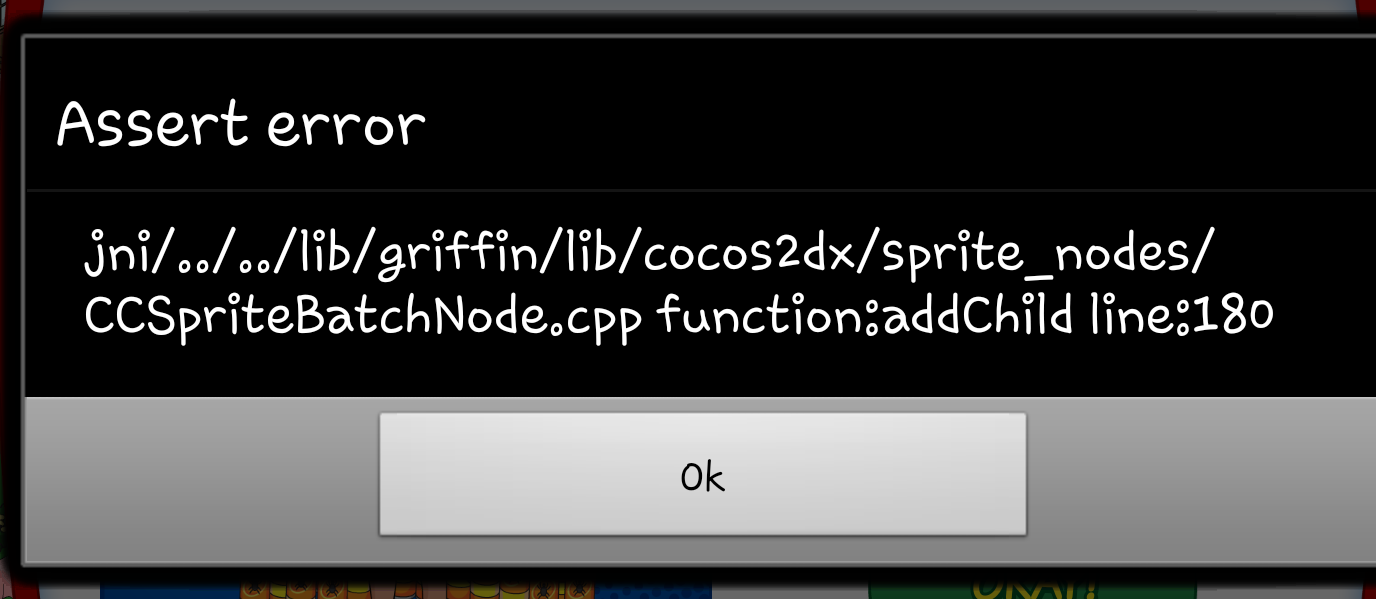
I am in the process of looking into it as we speak. Everyone else just sit tight in the meantime, they are WELL aware of it and doing what they can as fast as they can.
Here were are another Friday, so you know what that means…another update in our crazy lil Quahog Comic Con Event. So what surprises did this one bring? More details will be coming as we verify them live ….
Version 1.1.2
So far the updates hitting are resolving the issue of the cars not being able to rotate properly. As for the remaining content…we do not yet see it live in the games. That is not to say it won’t hit all of the sudden (this is actually early for an update than usual times. Lol.)
Stay tuned and as soon as we see more info, we will update it into this post. 😉
~Bunny






 Family Guy Addicts
Mine is down still, not linked to an email account so my town will be deleted if I uninstall, guess I have to wait for a patch- please let us know when its fixed
LikeLike
Will do. Have you tried contacting them to see if they could restore your game if you uninstall to correct?
LikeLike
Will the gamewide fix happen today because I haven’t linked my account so I can’t try and uninstall it.
LikeLike
I honestly do not know. Sorry. Have you tried repeatedly tapping the OK to see if it will let you in. At least long enough to try and link it? Or play for a bit?
LikeLike
Umm.. So no one knows if my screen name from “game center” on iOS pops up that I have a linked account or not. Want to try reinstall but very afraid I will loose it all!
LikeLike
Because it is impossible for us to know how YOU linked your account. Sorry. You would have had to gone through some kind of log in process when starting the game and only YOU would know that. You can always email TinyCo and ask if they see it linked to an account.
LikeLike
I will be extremely disappointed if they don’t add time to the 3 day timer with this outage. That is really the only thing that bothers me about the whole thing.
LikeLiked by 1 person
I hope they do too..
LikeLiked by 1 person
I killed Stewie a few times, and got the Lois costume unlocked… But I never got the costume. I tried reinstalling, I still don’t have the costume, and now the game crashes after I open it for more than 15 seconds. 😦
LikeLike
Try hard closing and restarting your device, then try again. If that doesn’t work try hard closing, clearing the cache, uninstalling, restarting your device and download again. (only do this if you have an account setup for your game) Let me know if either of those help it 🙂
LikeLike
After reinstalling I still had the crashing problem… So I deleted, cleared cache, powered the ipad, then reinstalled. That took care of the crashing, but I still don’t have Lois’ blaze costume. 😦
LikeLike
No where to be found in the inventory?
LikeLike
Friggin sweet! There she is! Thanks!
LikeLike
After emailing TinyCo about my iOS game crashing, I got the below note back. After reinstalling and logging back in, the game worked fine.
———————————————————————————
Matt F | August 09, 2014 | 04:03 -0400
———————————————————————————
On August 8th between 7:30pm and 9pm PST, players logging on received a bugged update to the game. This causes the game to crash upon completing the load screen. We fixed the bug after 9pm, so no new players are affected. However, those who logged in during that time will still see crashes.
To fix this, please uninstall and reinstall Family Guy: The Quest for Stuff from Google Play, the Apple App Store, or the Amazon App Store. Reinstalling the game gives a full set of fresh files and completely fixes this particular loading issue.
Important note on reinstalling and your game progress: Your game will be safely waiting for you when you reopen after reinstalling. If you had an account set up, such as by logging on with Facebook or using an email address, you may need to log back in.
If you see a blank game, simply complete the tutorial, and select the menu option to sign into your account. If you need to reset your password, you can do this through the account menu.
If you have any further problems logging in after reinstalling, please let us know.
Sorry for the frustration. We’re excited to see you back in Quahog!
LikeLiked by 1 person
I adore Matt. And yes, that is pretty much exactly what I have in the post too. Uninstall/reinstall…along with the steps to recover the account. 😉
LikeLike
Will the uninstall Matt posted still work if you didn’t have your account linked to an email address or Facebook?
LikeLike
It is something that is up to you to risk. Sometimes it might if you go fast. It is exactly what I posted in the link.
LikeLike
Are they still actually working on a fix for the people with no accounts or is your only chance to try the uninstall reinstall from the App Store?
LikeLike
I believe a fix is still coming for those with out accounts. We’re keeing a lookout for any new info that comes up
LikeLike
I just wanted you to know what TinyCo told me there is some information there that you don’t have in your post.
LikeLike
This is only if you have an account, correct? I never linked my game to an email it Facebook.
LikeLike
ugh i need 1 more orange pesticide (5 hours left) but i keep getting the green 1. 😦
currently working to the 3x
2 orange
5 red
6 green
2days 5hours left for car, 0/5 giant stewies killed.
Its hard!!
LikeLike
😦 Yes i agree. That’s why I broke down and got Bryan. But I’ve also been zapping stewies with all my saved up batteries for the challenge, since it’s timed.
LikeLike
I love that Bryan drops 4 pesticides every 2 hours for me it is helpful and much more worth while over the boxes
LikeLike
I have forced closed the app countless times, rebooted my phone 6 times since yesterday and I just reinstalled the app for the 2nd time because even after the latest update, I couldnt access my game. I hope this works *fingers crossed*
LikeLike
***paws crossed***
LikeLike
JESUS MURPHY IT WORKS!
LikeLike
Woo-hoo!!
LikeLike
I play both on adroid and iOs. I updated my adroid yesterday but I haven’t play on it yet. I don’t dare to update my iOs device since my game is running fine there. Any idea what will happen if I log on to my adroid? Will I be able to switch back and forth? Or will I be forced to update my iOs like it did a couple of times in the past with an update in the appstore?
Thanks for all the help you guys are offering, I’ll buy y’all a beer if you’re ever in Holland 😉
LikeLike
So far…the update is flowing just fine on my android. If you have linked accounts, you can swap between them by “signing in as someone else”. 😉
LikeLike
But will I be forced to update my iOs once i’ve logged in on my android? It’s happend in the past, and I don’t think I want to just yet…
Do you play on multiple platforms?
LikeLike
I do. iOS and android all working fine now for me with the newer version of 1.1.2 after reinstalls. 😉
LikeLike
This suckd it’s been 14 hours and I still can’t play as soon as the game loads an error screen pops up and says assert error with a bunch more stuff than switches right out if the game I’ve tried numerous things such as force closing the game uninstalling than reinstalling nothing works please help
LikeLike
If the uninstall/reinstall does not help, it is a matter of waiting for the patch. Sorry. You can contact TinyCo via email and let them know you are still down.
LikeLike
WOW,I tried everything you guys had on here to help with that error,and I can’t get my town back,I tried to get it back with the links and got screwed like JP did I have to start all over.
LikeLike
Start over? Or it just went to the new game and you need to log in as “someone else” to recover your town?
I linked the steps to recover in the post.
LikeLike
i hope they give us compensation for the “oops”! And i truly hope they get that “bug” out! What’s that exterminator’s number? lol
LikeLike
867 5309 😉
LikeLike
BAWAHAHAHAHAHA!!! Oh Jenny, where for art thou!! 🙂
LikeLike
The exterminator’s name is Jenny? LOL
LikeLike
If my game center Id pops up using iOS does that mean my game is linked or does every one have that on iOS ?
LikeLike
Everyone has a 32 character game ID on there “account info” screen
LikeLike
I think it’s slightly shorter on Android (at least on mine).
LikeLike
If you had used the option to link your device to an email or Facebook, you would have seen your Player ID at one point or another on the screen.
LikeLike
Hi, i have no wifi connection so i haven’t update to the lastest version in the appstore. Should i wait until all these problems solved? Do i miss anything from not updating? Thanks
LikeLike
The issue with the update has been resolved and the corrupted new info removed. 1.1.2 is working fine on me. You can wait if you would like and just keep playing how you are. 😉
LikeLike
I just attempted to load up my game, still brings up assert error, and my phone reboots. Do you know when the “repaired” update will actually allow the game to work for everyone? Seems it may take awhile before things are back to the pre-crash times! BAD KITTY!!!
LikeLike
I do not know when the patch will roll out. Are you linked to an account via email or FB? If so, I would suggest an uninstall reinstall of the app and follow the directions I put in this post to recover your linked email or FB account.
LikeLike
Thanks bunny. I think i’ll wait and see how it goes first.
LikeLike
I re installed the game but it has me starting all over. When I go to sign in with Facebook it says account already assigned to this device level 20. And I have resign in it will lose all the other one ans replace it to a level one. What do I do? Please help
LikeLike
Look closely at the wording. Compare it to the pic from the link I posted here to recover your account. The wording scares people. It SHOULD say it is replacing the NEW Level 1 game with the game you are linked up to and on your current level. Check again and let us know. 😉
LikeLike
Is there ever going to be a star wars update?
LikeLike
Fingers crossed…it is looking more and more like a possibility. 😉
LikeLike
So much for thinking I had my game fixed it worked while I was connected to Wi-Fi but now that I’m back to my cellular data the game once again is refusing to load
LikeLike
I think we have proven the connection theory. Your device seems to need a strong stable connection to load the game successfully.
LikeLike
I installed the game and reinstalled when I go to log in with Facebook it says account already exists logging in will restart you at level 1 and erase your current level 40. What do I do? Please help.
LikeLike
Look at the wording very closely. Compare it to the pic we have in the account recovery post I linked in this one. It SHOULD say it is replacing the Level 1 account (that you just downloaded with the reinstall) with w/e your current version Level is. The wording itself tends to make people panic. So look at it again and let us know.
LikeLike
Genius! Should have read it a little closer. It works perfect now, thank you!
LikeLike
Awesome. Happy to help out. 😉
LikeLike
Is anyone else dropping items they are have completed… I completed finding the hams for Chris but today when i zapped stewie it gave me another ham… Now I have 11 hams and no other character needs hams… Is this a glitch?
LikeLike
Many are reporting that this is going on. Please let TinyCo know you are dealing with it too. It seems the system thinks you still need hams due to Blobulous is not quite unlocked yet, so it keeps collecting them.
LikeLike
Ok thanks contacted tinyco…
LikeLike
Welcome 😉
LikeLike
Yes…I’m calling it the “Ham Glitch on Rye”…lol TinyCo is aware of this one. The “ham” item thinks there is another character that needs them. So it will keep spitting them out.
LikeLike
You should just collect them never know when your going to need them again
LikeLike
Game works again after reinstall and login, thanks for all the comments addicts.
LikeLike
In case you never created an account you can fix by manually renaming the the cache folder using a files browsing tool. Confirmed working on jail broken iPad
LikeLike
Are you referring to the events.cache folder?
LikeLike
So at this point I am assuming the super hero blam collecting android exclusive Joe costume will come a week after the event is over
LikeLike
I think the outfit is now “invisible” 😛
LikeLike
Will the gamewide fix happen today because I haven’t linked my account so I can’t try and uninstall it.
LikeLike
We are hoping! 🙂
LikeLike
Update also took away chance to win blobulous extra rare item by beaming nerds. The only way to get it now is with peters 8 hr overeating task or spending 150 clams. Really? Blobulous can help get pesticides but to get him you have to spend a week using peter on a low blam task ( and then he cant earn pesticide). Another blatant attempt to make us spend real money. Shame on you tinyco!!
Im not doing it. My strategy is to defeat giant stewie two more times to get the car; then ill send peter on that stupid overeating task until i need him for sonething else. Im saving my clams for nathan fillion
LikeLike
Sounds like a sound plan. 🙂
LikeLike
I got the 2nd car, but it does not show up on my inventory or anywhere else. Can we confirm if this will be given out later upon reaching this goal?
LikeLike
It should be in your inventory.
If you won it and you do not see it there, alert TinyCo please.
LikeLike
Thanks Bunny, I’ve looked and it’s not in there. I’ll alert them.
LikeLike
My game isn’t linked to anything. And I still can’t get into my game. It keeps on crashing. Will I lose all the people I unlocked?
LikeLike
If your game isn’t linked then it’s only stored on your device. You’ll have to wait until they push the patch through. Everything you have is safe right now as long as you don’t uninstall it from your device.
LikeLike
Thank you. I was so worried.
LikeLike
I have a question and apologize in advance if it makes no sense. I’m not 100% certain if I created an account with Facebook. However whenever ingame actions are finished I get a notification that identifies me by my first name “Jeff, come quick…” I also noticed I do have a game ID (really long numbers at the bottom). Does either of those mean I did in fact link to Facebook when I began playing? Thanks I’m advance for your assistance.
LikeLike
If the game is using your name (and that’s the name you use on your FB account), then you are indeed linked. The player ID number is the 32 character number on the bottom of the “account info” screen. Not the opening Splash screen. Everyone has one of these. Make sure you take a screen shot or write it down. 😉
LikeLike
Thank you for the reply and help. I was able to delete/reinstall game and everything it working fine now. You guys rock!!
LikeLike
Fantastic!
LikeLike
I linked my game to my Facebook account a while back. Is there a way for me to check to make *sure* it’s linked before I uninstall?
LikeLike
If you have the ability to visit “friends”, you’re fine. 😉
LikeLike
I can’t get into the game at all. It crashes out every time I try to open it. I was hoping there might be a way to check without being able to get into the game.
LikeLike
As far as I know, no. But if you want you can email TinyCo (email is in the post linked below) and see if they can verify it for you. Otherwise, if you set it up and linked it it should be good.
LikeLike
I downloaded the new update last night and after seeing all of the issues people had with it, I’m surprised/glad that I didn’t experience any of them myself! The only problem I had was endless connection errors, but I think that has more to do with the lack of wifi and spotty 3G connection at my cottage.
I’ve noticed a few people commenting on how expensive it would be to buy all of the new cool looking premium buildings – I have a solution! At the end of the event, TC should mark down the prices of the new premium item dropping buildings (record store, comic book store, fattys donuts, celebrities’ trailers, the diner, etc). I want the buildings but don’t want to pay the high price because they drop items – I’ll use my characters for the items. On the last day or two, when the items are no longer needed, TC could reduce the prices to between 25-75 clams for the players who just want them for aesthetic purposes. I’d be happy to spend all of my in game clams and purchase a small amount of clams to get many of those buildings.
I did contact TinyCo in game about this, and my message was received, but if enough people suggest an end-of-event-premium-building sale then maybe they will listen 🙂
Oh and I may have got this idea from the comments section on this website or another TQFS one, so if you posted it originally I’m sorry for taking it! Lol but I really like it
LikeLike
did the reinstall once!! all good now waiting on greenbacks and HELLO BRYAN!!
LikeLike
YAY!…glad you’re back into the game. Cranston is priced “high” (see what I did there?..lol) but his 2 hour pesticide earner is awesome. I’m getting 4 every time. 😉
LikeLike
yep, i know 500 clams is “high” lol yes i saw! 🙂 but for what i get from him and the ultimate goal i felt i had to cave lol 🙂
LikeLike
😉
LikeLike
Omg. TOTALLY worth it! Folks, if you can, buy him!!
I unlocked PS. So now, If I get RP & GT, I’ll be a happy addict! Don’t need the others, but will try for the complete set. Honestly, Bryan Cranston was the biggest draw for me.
I’m an SOA fan, so Ron will be a welcome addition. (Yes, I know SOA is just soap opera with motorcycles.)
And George, well he’s just awesome sauce all around. So yeah.
PS: has anyone else seen “Frankie Go Boom?”
LikeLike
I still think tinyco needs to do something I’ve dropped 25$ alone in the last week to only find out everything I was working on and excited about might be compromised for an asset error have they told you guys anything yet?
LikeLike
Only that they are still working on it. They have said the uninstall/reinstall is a workaround for now.
LikeLike
I don’t see an error message, just crashes. Boo.
LikeLike
You’ll need to uninstall and reinstall the game for now, this is TinyCo’s work around.
LikeLike
Curious if anyone else is having this issue. I have defeated Giant Mutant Stewie 4 times already, but my quest count for the car only shows 2/5.
LikeLike
Did you defeat him at all BEFORE triggering the car challenge. If so, those didn’t count towards it. I lost one defeat because I went before the challenge appeared.
LikeLike
That is probably what happened. I’m at 3/5 now after the last defeat. Harder to get now needing a lot of pesticide.
LikeLike
If you have more than 24 hours left on your car challenge, let your Giant Stewie timer run down to zero. This will reset your streak to 1X. You’ll only need 1 then 3 pesticides to get those last two “defeats” and the “Blaze” will be yours. 😉
LikeLike
Finally got to wifi and got my game to load again
LikeLike
Excellent!….I was hoping that just might be the ticket. 🙂
LikeLike
Thanks, your fix worked for me 🙂
LikeLike
Great! 🙂
LikeLike
I already have my game registered to an old facebook account, but I want to start using a new facebook account. Can I transfer my game to my new account?
LikeLike
No, you need TinyCo to unlink the game from their end so it can be re-linked to a new FB account. I went through the exact same thing…it’s a bit of a hassle. 😦
LikeLike
How many pesticides are in the mystery box that you get for 95 clans ?
LikeLike
Post coming later today……but, you have a chance to win up to 12. I would take a pass on them, not worth it.
LikeLike
Ya doesn’t seem worth it to me neither. 95 clams is a lot.
LikeLike
Especially when its likely youll only get 6 pesticide
LikeLiked by 1 person
If you need to boost your pesticide count rush peters 2 hour task. 4 clams per time so 23 goes and 3 clams to spare from 95. Ok you dont get 1 type of spray where its 1 of 2(orange/red or orange/green)but you get 23 in total so nearly twice as many as the max prize from the box
LikeLike
Yea…if you’re going to spend clams, much better deal! And you can choose between the two 2 hour tasks to at least have a better chance of getting a certain color. No way would I buy one of those “Boxes”.
LikeLike
Just uninstalled…. Not going to reinstall. I’m free at last!!!!!! Y’all should do the same. It feels wonderful!
LikeLike
Awwwwww! 😦 We’ll miss you Adam.
LikeLike
Yeah !!! I am back in the game. A second uninstall / reinstall worked. It’s annoying to have to wait to login after the tutorial screen. Tiny co should put a logon option on the load screen. TSTO has that option.
Also, tiny co should re word their messages when logging in after the tutorial. Their wording makes you think you will be over writing your higher level game with the level 1 game that you just went through to get to the logon screen. It’s very confusing.
Anyway back to zapping nerds and monster stewies….woohoo !!!!
LikeLike
Yay! Glad you’re back into your game. And you are correct on both observations! 😉
LikeLike
Any word from TinyCo on when a gamewide fix will surface? Hopefully sometime today, I can wait for that. Thanks!
LikeLike
No word yet, but seeing some things enter my game. Are you still locked out? If so, have you tried the uninstall/reinstall fix TinyCo has OK’d? Only do it if game linked for save backup.
LikeLike
Thanks to you guys I read a recent “basics” post and realized I didn’t have my game linked to a username for recovery purposes. So glad I took care of that because I was able to uninstall/reinstall and follow guidelines for recovery. I would have been heartbroken to lose all my progress and clams I have purchased. You are the greatest!!!!
LikeLike
Awww, you are too kind! So glad our silly lil blog helped you out! 🙂
LikeLike
Well, this does it for me…. The disappearing Comic Con issue is older than the Stevie issue, it’s more of a game killer, and yet TC can’t even be bothered to at least respond to their users regarding these problems while actually actively ignoring their problems to work on more recent developments. Screw these guys and their game. Life is too short to deal with people like that.
LikeLike
We’ll miss you Brandon, 😦 You’re right, if the game is no longer giving you joy…time to walk away.
LikeLike
Just some advice I found about the Pesticide Mystery Box… You are better off to rush either of Peter’s two-hour tasks continuously for 4 clams each and get a Pesticide each time… so for 96 clams worth of rushing you are guaranteed 24 Pesticides (Only 6-12 in the Mystery Box for the same price…) The only difference being the colour/type depends on the task and a bit of chance but still much cheaper for much greater pay off…
It’s when Tiny-Co thinks people are stupid like this that annoys me. But otherwise I’m loving the event. The Mystery box should be around 30 clams in my opinion. Hope this helps.
LikeLiked by 1 person
We will have a post soon…but agree with everything you said. 🙂
LikeLike
I totally agree. They couldve made it strategic by offering the mystery boxes for blam, so youd choose if its worth the sacrifice, buy instead they try to trick us into spending more real money. Getting tired of this approach reallllll fast.
This after getting stuck out for hours last night. Finally reinstalled before tinyco replied to my email, but i couldve ha the last red pestiide i needed by now. They didnt reset the clock for those affected or at least give us more time. Realllll frustrated
LikeLike
Thanks for the info. Last night the app wouldn’t start. My phone just kept rebooting. The u install and reinstall did the trick. Time for more pesticide hunting. Car I probably don’t have space for here I come 😉
LikeLike
Lol…glad you’re back to kicking nerd and Giant Stewie butt. Go get that space hog car! 😉
LikeLike
I got the error message you mentioned. Will I lose my streak with this error? This screwed up big time 😦
LikeLike
If you get back into your game in time, you’ll be fine. Have you uninstalled/reinstalled yet? Remember, only do it if you are linked to your email or Facebook account.
LikeLike
I double posted accidentally. I shall try it.
LikeLike
No problem…I deleted the second post. Let me know when you get back into your game. 😉
LikeLiked by 1 person
It worked, man! Thanks for the advice! Now I won’t lose my streak, neither my chance to get stuff! Thanks, Cybersilly!
LikeLike
Hey, that’s great news! Glad to hear your streak is still going. It was no problem. 😉
LikeLike
I tried linking my Facebook again and this time it worked. Sorry about the previous post
LikeLike
I’m just glad you are back into your game! 😉
LikeLike
Having a huge problem getting Brian out of the zoo as mutant Stewie has taken over and my screen freezes when I try and zap him off. I’ve. Contacted tiny co but anyone else resolved this?
LikeLike
Lots of problems with the game right now. If linked to an account, uninstall then reinstall. Use this post for assistance:
LikeLike
Uh oh. I reinstalled my game and it went back to level 1. I signed into Facebook and I’m still at level 1. I was so close to getting Ron Perlman. I’m not sure if I have it in me to start over. This means I lost Cleveland and all my 80s outfits.
LikeLike
You did, for sure, already have your old game linked to Facebook right? I’m praying the answer is yes!
LikeLike
I just clicked it over and over until it disappears… I love trying to help find ways to get around things or help other users. I helped Bunny be lazy on the val day update with tsto. By listing things that gave val cards when tapped. I try to post usefull info when I find stuff out and sometimes I either find out before you guys do or before you post it. But in all seriousness. I love you guys a lot and is there any info on how one could become an addict to help you guys out? I personally work on computers for a living. Haha anyways ttfn!
LikeLike
Just continue being a loyal freelance “Addict”! We all love it when you guys share with the other members of this awesome community. 😉 (now find me some ways to be lazy too) XD
LikeLike
Hey just letting you all know I got around the assert error by just tapping outside of the error box a lot. It comes up every time I open the game but I tap the bottom of the screen around 30 times quickly and it goes away then I can play with all features working fine
LikeLike
Thanks. 😉
LikeLike
Wow that actually worked. Thank you so much!
LikeLike
95 clams for Rupert mystery pesticides box ………no giggity
LikeLike
Lol…totally agree! 😉
LikeLike
Why…is…..everything……so……expensive……omg………I….am…………not……rich…..I….cannot….afford….all….these…..clams….why………TinyCo…..WHY………(stands up and does a darth vader-like noooooooooooooooooooooooo)
LikeLike
“TO THE MOON, ALICE” lol…see, that had a “space” reference too. I agree, it does get to be a bit much after a while (a very short “while”). 😉
LikeLike
Omg 🙂 so many space references can’t cope
LikeLike