
UPDATE 1230 AM EST: Try to uninstall and resinstall to see if issue is resolved and let us know. Before you do, make sure you were linked to a FB or an email account. If not, you will lose your game. I am trying this now myself. Those of you that did not link your accounts may have to wait for the gamewide fix to hit. They know no one likes having to uninstall.
FYI…the new content is gone for now. No info on its re-release, but I think we all can agree to have them wait to avoid this again. 🙂
If you games still seems a lil…OFF…try a force close or restart of your device to see if that helps to refresh it as well.
UPDATE 11PM EST: Some of the new content is hitting, however…many of us are seeing this instead…
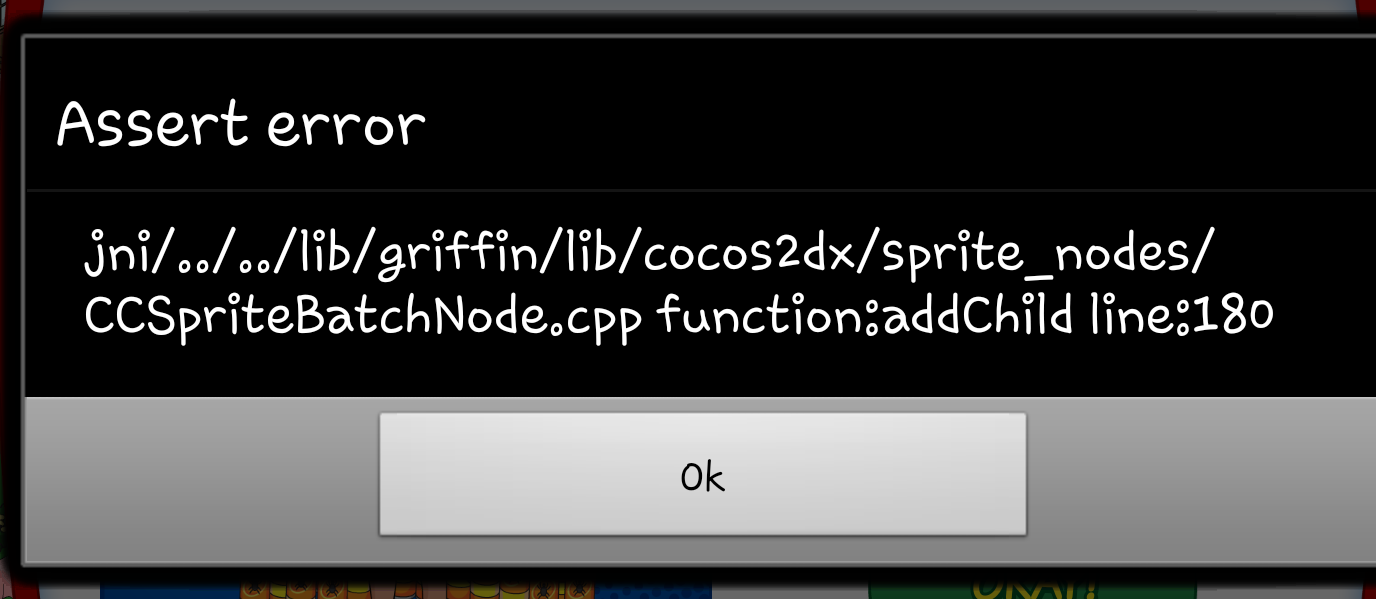
I am in the process of looking into it as we speak. Everyone else just sit tight in the meantime, they are WELL aware of it and doing what they can as fast as they can.
Here were are another Friday, so you know what that means…another update in our crazy lil Quahog Comic Con Event. So what surprises did this one bring? More details will be coming as we verify them live ….
Version 1.1.2
So far the updates hitting are resolving the issue of the cars not being able to rotate properly. As for the remaining content…we do not yet see it live in the games. That is not to say it won’t hit all of the sudden (this is actually early for an update than usual times. Lol.)
Stay tuned and as soon as we see more info, we will update it into this post. 😉
~Bunny






 Family Guy Addicts
I too am able to get past the assert error message by repeatedly and rapidly hitting the OK button. the only glitch I have found is I am unable to access alternative quahogs. but everything else seems to be fine. I just linked my game to my email account but I’m still afraid to uninstall because of what I’ve read. So I guess I will just wait it out.
LikeLike
I just noticed that because of this update error they gave me an extra day to get Blaze
LikeLike
Yes it seems they extended the challenge 🙂
LikeLike
Yay thanks Tinyco for 2+ days of lost playtime 😦
LikeLike
😦
LikeLike
I feel really sorry for those guys who have lost their games. I think it must be a bit of survivor guilt because I never got the update with the dodgy code: my device was off as it was night here in the uk. I was deliberately behind in the game so have not missed the missing new content yet either. I feel lucky ~ perhaps I should buy a lottery ticket!
LikeLike
Might be a good idea 😉 Let us know if you win!
LikeLike
No ice cream, the game seems glitchy because I cannot see the left side of the town with the smoke debris with all the trees even though I’m clearing it up and I have 14 out of 10’hams, does this mean my game’s a bit of a mess ?
LikeLike
No everyone’s game is suffering the dreaded extra ham glitch. Ham party! 🙂
LikeLike
Wait i just saw this update in the App Store i dont know weather to update it or not should i?
P.s. I have linked my account
LikeLike
Safe to update now. 🙂
LikeLike
if you can sign in on another device ti make sure you associated with a Facebook or Google account uninstalling then reinstalling works in the event of the assert error
LikeLike
How do i link my family guy app to a facebook or email account?
Sent from my iPhone
>
LikeLike
Check out this post 🙂
LikeLike
Thanks for the response but i can’t even log in to the game to use those instructions! This is really frustrating
LikeLike
Ah…Well if you’re on Android they just released a patch to fix everything. (iOS should be out soon) More info can be found here:
LikeLike
I was getting the sprite error so did the full delete and reinstall. Funny thing is that when I start the app I don’t start with the initial movie but in one of the first few quests at a point where I can login as another email account and reload my actual game. It seems there is local game save somewhere for my device??
My what the hell question for tinyco would be: how badly coded was the update when it can bypass android app failure and instead cause my phone to restart?!
LikeLike
I think it was just 1 corrupt file causing everything to go haywire. BUT that’s just my guess & a question for TinyCo for sure…. Hopefully they’ll come out with something explaining just what went wrong 🙂
LikeLike
I’ve reinstalled multiple times and it still crashes. I can’t believe how buggy and glitchy this game is. I could understand if the game just launched or something(like TSTO), but it hasn’t. It’s BS. Sometimes I wonder if They intentionally put out a subpar product just to cash in on the TSTO craze. TSTO>>>>>TQFS
LikeLike
Best thing to do is send them an email about it. Could be something specific with your device. Did you clear the cache before you uninstalled? The corrupt file could still be on your phone. We recommend hard closing, clearing the cache, uninstalling, restarting your phone & then redownload. See if that works for you..if not best bet is to send them an email about your crashing issues 🙂
LikeLike
I missed out on Blaze because of the crash yesterday. But when I click on the Comic Con icon there is a check mark showing I have it? Did this happen to anyone else?
LikeLike
Did you check your inventory? See if they gifted it to you.
LikeLike
I found that if I keep hitting the assert error (the okay button) over and over and over again really fast it goes away! i get to play the game as normal after getting pass the assert error. i really hope this advice helps someone because I have been so irritated with this game not working especially when i did not back up the game with an email and i do not have a Facebook. so remember when the assert error pops up hit the okay button over and over and over again and see if that works. if it does let me know! if not I’m sorry 😦
LikeLike
Hi!
Have ya’ll been able to find out if TC has commented on having a time frame for the patch to be done? I definitely plan to wait for it as I’m one of those who never linked their account to FB or email and I am too afraid to uninstall/reinstall due to some of the other horror stories I’ve been reading about lost games. I’m so lost with out this app! I didn’t realize how addicted I was until this glitch hit! Can’t wait to get back in the game!
LikeLike
Unfortunately, we don’t know when they’ll be releasing the patch. I hope real soon for the sake of all those players that can’t get back in because they haven’t created an account. As soon as we know we’ll pass it along 🙂
LikeLike
New glitch!! Cleveland is at the spa and it is shaded like there is a latcher but instead there is a check above it, when clicked the ray gun starts to do it’s thing but freezes.. I’ve contacted support and waiting for a reply
LikeLike
Yea it’s popping up more and more today. Hopefully they get back soon on it
LikeLike
I was gonna ask about that; I have Lois trapped in the Fab 4 HQ and I need her for a task. I take it no one has a work around just yet? Lol, if someone has, this is the place to come and find out 🙂
LikeLike
Seems like the work around is to just wait it out. Stewie eventually we’ll jump to another building 🙂
As soon as I zip through this comments I’ll be doing a post about this 🙂
LikeLike
That’s what I thought, but this community is so resourceful a fix would have been very likely 🙂
Don’t forget to take some time for yourself today too 🙂
LikeLike
lol today’s my catch up day. Hubs is away at a Phillies game all day so I’ll be here catching up on posts, laundry, and some cleaning (Exciting I know! 😉 ). Can’t complain though had a great weekend with family that lives out of state so I don’t get to see that often…so I had my fun days Friday and Saturday 🙂
LikeLike
Today’s my laundry day too, lol.
Glad you had some fun this weekend 🙂
LikeLike
lol something about Sundays.
Yes, it was a nice weekend 🙂 Even had my Nan from TN leave us with some of her awesome Strawberry and Pear preserves…always love EVERYTHING she makes! 🙂
Hope you’re getting a nice weekend in too…even with all the laundry 🙂
LikeLiked by 1 person
After tapping non-stop outside the error box… my game finally worked! YEAH!
I never registered or linked my game to either FB or Google Play but now I’m doing it just in case another glitch happens so my game is saved.
LikeLike
Yes, make sure you do it. Also grab a screen shot of your code and keep it somewhere safe. Just in case.
Glad you’re back in! 🙂
LikeLike
Thanks for that tidbit, Alissa.
I kept on wondering what those numbers were for when the game loads…now I know. Ta!
LikeLike
Ok, does anyone else miss the Gyro truck “floating?” I liked how it seemed to be on the road when I placed it. Since the update, it’s now on the grass. Not a big deal, but was kinda stoked to have cars able to be “placed” on the street.
LikeLike
I want the Stewie mutant bombs!! C’mon TinyCo, I know you’ve got them so let’s get on with it 🙂
LikeLike
MINE MINE MINE MINE…You can’t has!! 😛
LikeLike
hey guys its been a busy day i got the blaze as well as red hot lois,but as always a question.in enfant terrible pt 6 vanquish giant stewie 4 times but counter says 2/3
LikeLike
Lol. Yah…they know. Working on fixing it. Should be 4. 😉
LikeLike
I only did 3 and it cleared part 6.
LikeLike
hi guys this is first time posting here, i have been foolwing you guys for a while and would like to to say thanks for all the posts and help you guys have given, i am very greatful and appreciate all these posts; regarding tiny co, they are a decent company and i done they said, i reinstalled the app on my iphone 4, i had to go through the turorial again; after i unlocked chris; (you have to play abit of the tutorial); i was able to go to the accounts page; i then logged into my facebook and it said do you want your old save game i said yes and everything i had was exactly the same as i left it. i am not why its not working for some people all i can say is to be patient and they will sort it out and i am sure they will give compensation; it has happened to other games such as tapped out as well so its not a single case; also you know the challange when i got back into the game it said 1day 18hr and i just checked and it said 2days 15hrs so they did extend it. I hope tiny co does give some kind of extra compensation. Just dont get frustrated remember they are company and they will have problems and make mistakes but they are a good company and it is a decent game. i do hope in the future there is more free opportunies and where characters are easier to get and be able have cheaper premimum items. Anyways thanks again for all your guys hard work and i look forward for future posts.
LikeLike
Well thank you for the kind words and we’re glad you decided to make your first comment. Hopefully it leads to many more 🙂
LikeLike
What did I miss? I didnt login for half the day, stewie bombs?
Im sure they shall return….I did just get blobulous part 3 quest out of nowhere, was that new or did it glitch for a few days as I did part 2 on Friday I think.
LikeLike
Looks like I missed any issues?
I didn’t log on for a good 12-14 hours today.
LikeLike
Okay so I’ve collected all the ham for Blobulous but they’re still dropping?
Kind of irritating when giant mutant stewie could be dropping other rare items.
Anyone else having this problem?
LikeLike
We have reported it to TinyCo. Please do the same.
LikeLike
That’s it – I’m done.
I spent over $300 this week and now – after following directions from TinyCo, my level 40 game is completely gone.
From their e-mail – To fix this, please uninstall and reinstall Family Guy: The Quest for Stuff from Google Play, the Apple App Store, or the Amazon App Store. Reinstalling the game gives a full set of fresh files and completely fixes this particular loading issue.
Important note on reinstalling and your game progress: Your game will be safely waiting for you when you reopen after reinstalling. If you had an account set up, such as by logging on with Facebook or using an email address, you may need to log back in.
Note the “Your game will be safely waiting for you when you reopen after reinstalling” NOPE – they REQUIRED being linked for this to work. Thanks for giving us clear directions. I should have read the posts here first.
I am DONE and have requested a full refund. /rant off
LikeLike
Sorry that you did not realize by their wording you needed an account to log back into. (Sometimes you don’t)
They may still be able to recover your account if you message them and get you back to where you were. Up to you though. Can understand why.
LikeLike
A bunch of odd glitches today. The Hams just keep on coming! Tried to get in on the Clam Blam deal and there are no prices. It says wait where the price was. My music just stopped working but the sound effects work.
” Earn 4000 free Blam! when you buy wait or more clams!”
LikeLike
Did you alert them on any of it?
We alerted them on the hams. I suggest the same.
LikeLike
I did what they said and it deleted my entire game and made me start completely over. So mad…
LikeLike
Deleted…or you just need to relog in? It needs to know you have a game.
LikeLike
I never set up my log on account in the game – either FB or email. If I uninstall and reinstall would I lose everything? or “Email” means the one I use for Google Play account? (Android user)
LikeLike
It is a risk you chance anytime you reset something without some kind of back up for it. Similar to a computer you reset to factory. You never know what remains without that save point. You can wait on TinyCo and the patch they were working on. Or even email them. help@tinyco.com
LikeLike
You would have needed to sign in to Google inside of the game under the account info button. If you didn’t do that, or can’t recall that you did, I’d advise waiting for the patch.
LikeLike
Seems like fun but I’m still here with the sprite glitch yay
LikeLike
I love the game, and will continue to play it, but this is exactly why I never sink any money into “free to play” games. Can you imagine having this happen after buying the $99 clam package? The fact that the game was not released AFTER being fully developed will continue to open the door for problems.
LikeLike
I think it would be hard get any investor to agree to fund something like this for multiple years with no revenue coming in only for it to flop. Obviously, somebody dropped the ball here but really this is the first widespread technical SNAFU they’ve let out of the building. So I’m willing to cut them a lot of slack here. (Although who releases builds with asserts turned on? I mean, really!? 🙄 😆 )
LikeLike
Lol
LikeLike
Also, let’s all forget about how, way back on Thursday, I wrote: “This game is way too stable to be written in C++.” Erm… in light of an assertion in a .cpp file, I can now say “that was not meant to be a factual statement.”
LikeLike
Lol. I remember…even that waaaaaaaaaaaaaaaaaaaaaay back. 😉
LikeLiked by 1 person
I agree it’s the first widespread error, but it’s one thing for an app not to function properly; it’s another for it to actually reboot my phone. Obviously this game is being released in sections, and to me that would appear to be the biggest source of potential problems. Especially when you take into account the necessity for it to be compatible with so many different devices.
LikeLike
So many hams but no ice cream…. The horror (insert the painting the scream here)
LikeLike
New update wont load my game…says assert error and forces my phone to shut down
LikeLike
Did you try the troubleshooting in the post of uninstall and reinstall the app with a linked Facebook or email account?
LikeLike
So I am getting the felling that because I didn’t link my game to my email that I am screwed.
LikeLike
Not necessarily. They are still trying to get a gamewide update out. Those take a lil more time though.
LikeLike
I’ve found 12 outta the 10 hams needed for blobulous!! Nothing else out needs hams. Just wandering if this is a glitch that’s wasting my giant stewie drops or if it’s stocking them up for something down the line
LikeLike
Yes hams are popping out in an over abundance at the moment. We’re looking into it to see if it’s a new glitch.
LikeLike
So many hams haha
LikeLike
Ham it up! 😉
LikeLike
Hi I was asleep when update hit so have avoided the above chaos, however the update is still sitting in App Store and I don’t know whether it’s now safe to go ahead and update. The mystery boxes are appearing in my town without the update so don’t know what to do.
Also my Giant Stewie seems be resetting to 24 hours after every spray. 1. 3, 8. Is this normal?
Also do you think batteries will come back into the game, I have little stockpile but do I keep or do I zap away.
Finally whereas I applaud TinyCo for a packed event that keeps us constantly busy I think they are going lose players with the premium items prices, they are too high, the clam cost of the Rupert mystery boxes are madness. I hope they look at the feedback and either increase amount clams we get for our bucks or reduce the premium item clam costs.
LikeLike
Version 1.1.2 is the newest one. Should be fine to go as they removed most items causing issue.
Reset seems to be hit n miss for players. If yours is doing it, awesome.
I keep winning batteries and zapping stewie. He gives me Blam! and materials I need for characters.
Please give them feedback on the cost of things. Just message them from your game. They have been adjusting the game on player response. 😉
LikeLike
Thanks Bunny, I have sent TinyCo a nice message asking then to show some pity for us with the premium costs.
Now I best go as I’ve mutants to zap, pesticide to spray and I’m on the hunt for those elusive sundaes, guess that makes today Sundae Sunday *groan*
LikeLike
Tries to uninstall and reinstall the game. It works at first but as soon as I recovered my save the game crashed and my phone restarted against my will….over and over again. If they didn’t want me to zap stewie 15 times for the car they could have just asked me to stop instead if breaking the game.
LikeLike
Hi!
After crashing for about 8 hours, everything is under control now, apparently.
One detail is that the game shows the nailgunner icon instead of hot rod in the fabulous promo task window.
LikeLike
Yea, odd but the Blaze will appear when finished 🙂
LikeLike
This is still not fixed for everyone, I just now reinstalled and having the exact same issues.
LikeLike
My game is fixed! Tinyco was a great help. Had to uninstall/reinstall.
My only frustration was I was at x25 blam only to not have the reward. I’m back at x15 now though 🙂
LikeLike
Glad you got it back! 🙂
LikeLike
After corresponding with Tinyco, got my game back! I had to uninstall/reinstall.
I was x25 blam, but I did not receive the reward. I am back x15, but still a little upset I didn’t get my reward 😦 oh well.
LikeLike
When TinyCo does get around to releasing the patch to fix the major crash glitch, will it be an automatic update or do we have to go to the google play store and install the fixed update from there? Thanks!
LikeLike
More than likely it’ll be app store
LikeLike
Thank you so much I was thinking to myself that I was gonna miss out on getting the blaze and on top of all of that I just got Bryan Cranston but it’s all good now thanks alot 😊
LikeLike
When will the gamewide fix happen. Because when I go to play it says that I have to update to play it but when I go to the play store there is no update available. Also I can’t uninstall it because my account isn’t linked.
LikeLike
We do not know.
LikeLike
Uninstalling worked to get me back in the game, not before the streak meter rest for big mutant Stewie 😦 But I’m having other issues now. Is anyone one else collecting more hams than needed? I have 12 of them and zero sundaes.
LikeLike
Yes…a ton of people. We’re looking into it to see if it’s a new glitch occurring
LikeLiked by 1 person
Redownload 3 times now after the game would restart my phone on the pesticide boxs now since Re-download i can’t get past the loading screen and since im one of many customers whos spent 150+ real money helping develop this game i could get little extra perks or someone too go in my account and fix it. Now im missing the 2nd mystery challenge, will extra time or ability for me too get everything be available when my games running again? My account is connected to my Facebook Tyler takacs thanks for help in my other post but its still giving me problems 😦
LikeLike
Sorry. Only TinyCo is authorized to access any players account. It sounds like you may need to reach out to them. Through email if you need to. help@tinyco.com
LikeLike
Did this effect android two because I was not affected at all
LikeLike
Yes, both iOS and Android were impacted. However, some players did not seem to get hit with it (luckily)
LikeLike
I’m normally really bad with luck I was speeding peters action up and I only git yellows when I needed greens lol
LikeLike
😦 gotta lovewhen that happens!
LikeLike
I don’t Really Get What Happened I check the blog and see this and I’m like wth and also the only thing I’m focusing on in the event are the people on the front screen. Any idea if Cleveland coming to those who missed the event I do have an idea about the airport district and you fly to stoolbend would be cool
LikeLike
No idea on Cleveland. Issue, be glad you avoided it. Lol. 😉
LikeLike
I
Am
Glad if I wasn’t tiny Co would have another person not on the game because I lost adventurepeter with. class so they refund me and I can’t get him
LikeLike
I just uninstalled FGTQFS, reinstalled the game, log back into my account and everything turned out fine…. for now. Hopefully thus helps. Playing on Samsung Galaxy 3
LikeLike
If i don’t have an fb account then what?
LikeLike
Email
LikeLike
I have not linked my game to anything so I cant uninstall. I have emailed tinyco but no response. When are they sending the fix.
LikeLike
We do not know. Just a waiting. You can email them if you’d like. Help@tinyco.com
LikeLike
I’m not exactly sure what is happening. I’m in Hawaii and am 6 hours behind EDT. Noticed your most recent update was at 12:30am EDT which would’ve been 6:30pm my time. I’ve was playing all day and night and have not had any crash of any sort but from what I’m reading in the comments it seems like everyone has been having issues. Should I be reinstalling even if my game is currently up and running? The only issue I’ve had was this morning, afternoon for the east coast, was that when I sprayed giant stewie the blam didn’t drop for me to pick up which was a little weird. I know my blam total increased so I didn’t consider it would be worth sending a report to TinyCo about it. Thoughts?
LikeLike
I guess I should also add that I didn’t do the update to 1.1.2 and play on iOS.
LikeLike
You might have been lucky and missed out on updating via the app store until after they pulled the glitchy version back. That’s the only thing I can think of with that..
LikeLike
Thanks for the quick response Alissa. So it should be safe to do the update now?
LikeLike
For my game, I have the new version and no issues. Just make sure you have an account set up to back it up, just in case. 🙂
LikeLike
i am connected to my fb and uninstalled it which failed. i then did a hard reboot which failed. i emailed tinyco and they havent responded yet. i am getting annoyed by it and hope they fix it and give us an extra day
LikeLike
yowsa. i’ve had trouble logging in all morning. did all the steps reccomended here and on the tinyco site. i was sadface.
after i submitted my service ticket – i tried to open the game on a whim – My husband laughed at my loud WUHU!
it’s ok – he’s addicted to World of Tanks and Warplanes.
Now i have to let tinyco know it’s all ok!
I still can’t figure out how to purchase clams from google plus – via my kindle, but hopefully someone will work that out.
linda
LikeLike
ack. nope, nope – not fixed. rrats.
LikeLike
oh no! And you tired the uninstall/reinstall correct?
LikeLike
i’ve tried all the things that you’re supposed to do – my game hasn’t reset. Everyone says that tinyco has gotten back to them – all i get is a form email. nothing personal. i’ve submitted support tickets via their website. what am i doing wrong.
LikeLike
Try one more thing (if you have not already). Go to your phone or device app settings. Clear out ALL the cache and data for Family Guy Quest For Stuff. Then…uninstall the app. Once that is done, restart your device. Once it is powered up, reinstall. THEN try to log back in.
Hopefully this will get rid of the corruption and all you need to do is log back in after a few taps. Outside of that…hang in there for a contact back. It is the weekend. They are light staffed. And there are a million other players sending in help requests too they need to get through. Give them some time. 😉
LikeLike
I’m on a kindle – therefore there is no cache. I’ve uninstalled the app from the device and from my amazon cloud. re installed it and tried to log on – but it’s not recognizing any of my log ons.
how does tinyco usually contact us – via email? cause i’ve submitted 2 tickets – the other about payments – and all i’ve ever rec’d is a form email
linda
LikeLike
Email, or through the messaging system in your game. Usually same way you send it to them.
It is the weekend. Light staff. LOTS of issue tickets. Hang in there, they are trying to get to as much as they can as fast as they can.
LikeLike
I uninstalled it, cleared my cache, reboot my phone and re-installed it. I had to redo the 1st part quest until it had the settings option to sign back in and then it asked if I wanted to it found my Facebook account nd wanted to confirm tjat I wanted to replace the 1st level game. I selected yes, it loaded the game agin and logged into my saved game. works for now. Fixed!
LikeLike
sweet! 🙂
LikeLike
WOohoo.
LikeLike
You can download bluestacks and get around the glitch if uninstall doesn’t work for you. You can also use bluestacks to link your account to facebook or google to save your game to try the uninstall. Bluestacks is free. It’s an android emulator. It is still in beta stages so it is a bit quirky but I was able to log in and get around the glitch. Killed two Stewies this morning. Please don’t comment on this post if you haven’t tried this work around. I am only trying to help people get back in their game while the event is going so they don’t lose all the hard work they’ve put into it. I did this myself and was able to save days of tapping.
But as anything use at your own risk right Cyber? lol. Hope that helps some folks at least.
LikeLike
Lol. Very true. Player beware. BETA is a funny thing.
LikeLike
Actually, Bluestacks exited Beta on June 7th… It is now a full product!
LikeLike